VoIP Implementation Guide in : Setup, Checklist & Best Practices
TLDR:
VoIP implementation takes most businesses under a day for cloud-based systems. Here's what this guide covers:
- 01Pre-implementation requirements — bandwidth, network, security, and equipment checklist before you begin
- 02VoIP system types — on-premises PBX vs. cloud-based PBX vs. device-based: which fits your team
- 0310-step VoIP setup guide — from needs assessment through go-live and ongoing maintenance
- 04VoIP implementation checklist — a scannable pre/during/post checklist to keep your rollout on track
- 05Best practices and common mistakes — what separates smooth migrations from painful ones
- 06How CloudTalk simplifies VoIP setup — cloud-based deployment with AI features included from day one
VoIP implementation is far simpler than most teams expect — especially for cloud-based systems. The full process from decision to first live call can take less than a day. This VoIP implementation guide walks you through every step: requirements, system selection, setup, a practical implementation checklist, and the best practices that separate smooth rollouts from expensive ones.
VoIP Implementation Requirements: What You Need Before You Start
Before configuring anything, four infrastructure requirements determine whether your VoIP deployment will deliver clear, reliable calls — or frustrating dropouts and quality issues. Check all of these before selecting a provider. For a deeper technical overview of how VoIP transmits data, see our guide to VoIP protocols.
1. Sufficient Bandwidth
Bandwidth is the capacity of your internet connection — how much data can flow simultaneously. VoIP calls are data streams, and without enough bandwidth, calls drop or degrade in quality. As a rule of thumb, allocate 100 kbps per concurrent call. If your team makes 20 simultaneous calls at peak, you need at least 2 Mbps dedicated to voice traffic — more with headroom for other business applications.
Use CloudTalk's VoIP bandwidth calculator to work out your exact requirement based on your call volume before you start. If your current connection can't support the load, upgrade your internet tier before implementation — not after.
2. Low-Latency Network
Latency is the delay between your voice leaving your device and arriving at the other end. For calls to feel natural, keep latency under 150 milliseconds. Above that, conversations develop noticeable lag that disrupts the natural rhythm of speech. Jitter — the variation in packet arrival times — should stay below 30 ms to prevent choppy audio. Both are worth testing before going live; our guide to VoIP jitter explains what causes it and how to fix it.
3. Quality of Service (QoS) Settings
QoS lets your router prioritize voice traffic over lower-priority data like file downloads, video streaming, or software updates. Without QoS, a large file transfer can degrade call quality in real time. Enable QoS on your router before go-live and tag VoIP traffic for priority treatment — this single step prevents most call quality complaints post-launch. For the setup process, see CloudTalk's guide to QoS in business telephony.
4. Security Measures
VoIP calls travel over the internet and are subject to the same threats as any other data: eavesdropping, toll fraud, and phishing. Before implementation, confirm your provider encrypts calls end-to-end, holds relevant compliance certifications (ISO 27001, SOC 2, GDPR, HIPAA if applicable), and has documented incident response procedures. Review our guide to common VoIP security risks for the specific threats to address.
5. Equipment
For cloud-based VoIP, you need less hardware than most teams expect. The essentials are a stable, high-speed internet connection; VoIP-compatible devices (IP phones, computers, or smartphones running a softphone app); and quality headsets with microphones — ideally with active noise cancellation for agents on high call volumes. Physical IP desk phones are optional — most modern teams run entirely on softphones installed on their existing devices.
3 Types of VoIP Systems: Which One Is Right for You?
The right VoIP system type depends on your team size, IT resources, budget, and flexibility needs. Here's how the three main options compare:
VoIP System Types Compared
| On-Premises PBX | Device-Based VoIP | Cloud-Based PBX | |
|---|---|---|---|
| Upfront cost | High — hardware investment required | Moderate — depends on device quality | Low — no hardware required |
| Scalability | Limited — hardware upgrades needed to scale | Moderate — add devices as needed | High — add users instantly |
| Control | Full — complete control over infrastructure | Moderate — call quality tied to device and internet | Shared — provider manages infrastructure |
| IT requirements | High — requires technical staff on-site | Low — minimal technical expertise needed | Very low — provider handles maintenance |
| Remote work support | Limited — tied to physical location | Good — works from any internet connection | Excellent — built for distributed teams |
| Best for | Large enterprises with dedicated IT teams and specific compliance needs | Small businesses, freelancers, and remote-first teams | Businesses of all sizes seeking flexibility, low cost, and fast setup |
Which type do most businesses choose?
Cloud-based VoIP (hosted PBX) is now the default for the vast majority of SMB and mid-market businesses. It requires no hardware investment, scales instantly, supports remote and hybrid teams natively, and includes advanced features (AI, analytics, CRM integrations) that on-premises systems require expensive add-ons to replicate. For a full breakdown, see our guide to cloud PBX, or our dedicated guide to VoIP for small businesses.
How to Set Up VoIP: 10-Step Installation & Implementation Guide
Whether you're implementing VoIP for the first time or migrating from a legacy system, these 10 steps cover the full process — from initial planning through post-launch optimization.
Step 1: Assess Your Business Needs
Start by defining what your phone system needs to do — before looking at any provider. Teams that skip this step waste time evaluating platforms that don't fit, or discover post-launch that a critical feature is missing.
Answer these questions before moving on:
- 01Team size and call patterns: How many users will be on the system? How many calls happen simultaneously at peak?
- 02Remote vs. in-office: Do you need the system to work across distributed locations or from home offices?
- 03Must-have features: Do you need IVR menus, call recording, CRM integrations, AI transcription, or outbound dialing capabilities?
- 04International calling: Will you need local numbers in multiple countries? See our guide to international phone numbers for what to check.
- 05Compliance requirements: Does your industry require HIPAA-compliant calling, call recording with consent, or specific data residency? Our guide to HIPAA-compliant VoIP covers healthcare and regulated industries.
- 06Current pain points: What's failing with your existing phone setup that VoIP needs to fix?
Step 2: Set a Budget
VoIP costs vary significantly by system type and provider. Cloud-based platforms (such as CloudTalk) typically run $15–$50 per user per month, all-inclusive. On-premises systems carry much higher upfront costs — hardware, installation, and ongoing IT management. When calculating total cost, factor in: per-seat subscription fees, international calling rates, number porting fees, add-on features (AI, analytics, compliance), and implementation support. For a full breakdown of what businesses actually pay, see our guide to business phone system costs.
Step 3: Audit Your Network Infrastructure
Before choosing a provider, verify your network can support VoIP traffic at your expected call volume. Key checks:
- 01Internet speed: Run a speed test and verify consistent upload and download speeds — not just peak speeds. VoIP quality degrades during congestion.
- 02Packet loss: Keep packet loss below 1%. Above that, call quality drops noticeably. See our guide to packet loss and call quality for how to measure and fix it.
- 03Jitter: Measure current jitter levels and target below 30 ms.
- 04Router QoS support: Confirm your router supports QoS settings and that you have admin access to configure them.
- 05VPN usage: Avoid routing VoIP calls through VPN — it adds latency and often degrades call quality significantly.
Step 4: Choose the Right VoIP Provider
Your provider shapes everything: call quality, feature availability, integration options, and how quickly your team can get up and running. Evaluate providers on these criteria — or see our VoIP buying guide for a complete framework:
- 01Uptime and reliability: Look for providers with a documented SLA of 99% or higher. Check status pages for historical uptime.
- 02Features and integrations: Confirm the platform includes the features on your must-have list — call flow designer, call recording, analytics, CRM integrations — and that they're included in your plan tier, not add-ons. See our full VoIP features guide for what to prioritize.
- 03Scalability: Can you add users, numbers, and features without re-negotiating contracts? See our guide to VoIP scalability for what to check.
- 04Customer support: Is live support available during your business hours? What's the typical response time for critical issues?
- 05Free trial: Test the platform with real call volume before committing. CloudTalk offers a 14-day free trial with full feature access.
Step 5: Plan Your Number Strategy
Decide whether to keep existing numbers, get new ones, or both. If you're porting existing numbers, start the process early — number porting typically takes 2–4 weeks depending on your current carrier. CloudTalk's number porting service handles the transfer process end-to-end. Plan around this timeline to avoid any gap in service.
For new numbers, consider: local numbers for each market you serve (CloudTalk provides numbers in 180+ countries), toll-free numbers for inbound customer support, and virtual numbers for teams working across multiple locations.
Step 6: Install and Configure the System
For cloud-based VoIP, phone system setup is primarily software configuration — no physical infrastructure required. The typical process:
- 01Create your account and select your plan
- 02Download the app on team devices (desktop, mobile, or browser-based)
- 03
- 04Assign numbers to users and departments
- 05Connect CRM and helpdesk integrations — sync call data to Salesforce, HubSpot, Zendesk, or your existing tools
- 06Configure QoS on your router to prioritize VoIP traffic
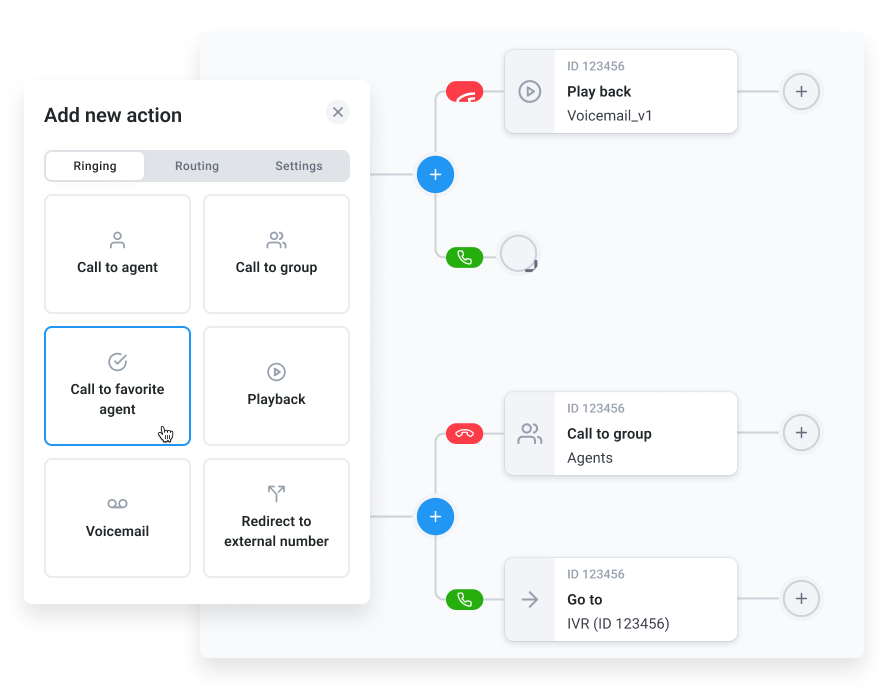
For on-premises VoIP, the installation process is more involved — hardware must be physically installed and configured, typically requiring a certified VoIP technician or experienced IT staff.
Step 7: Integrate With Existing Business Tools
A VoIP system that doesn't connect to your CRM and helpdesk creates more admin work, not less. Before go-live, set up integrations so that call data, recordings, and outcomes sync automatically — agents should never need to manually log a call. CloudTalk integrates natively with 40+ apps, including all major CRMs and helpdesks. Review our guide to VoIP CRM integration for setup best practices.
Step 8: Train Your Team
Technical setup is only half the job — team adoption determines whether implementation succeeds. Effective VoIP training covers three areas:
- 01Basic operations: Making and receiving calls, transferring, holding, voicemail, and using the mobile app
- 02Advanced features: Call monitoring, call recording, analytics dashboards, and any AI features your plan includes
- 03Department-specific workflows: Sales teams need outbound dialing and CRM sync training; support teams need queue management and escalation procedures
Create a quick-reference guide covering the most common tasks for your team's specific workflows. A 30-minute onboarding session is usually enough for cloud-based systems — agents are productive within hours, not days. Our guide to sales agent training covers how to structure role-specific onboarding.
Step 9: Test Thoroughly Before Go-Live
Never go live on a Monday morning with untested setup. Run a structured test phase first:
- 01Make internal test calls between team members — verify call quality, hold, and transfer functions
- 02Make external test calls to mobile and landline numbers
- 03Test IVR routing — confirm callers reach the right destination at each menu step
- 04Verify CRM sync — make a test call and confirm it logs correctly in your CRM
- 05Test at different times of day — call quality during off-peak hours may differ from peak usage
- 06Run a pilot with 5–10 users before full team rollout — catch issues at small scale before they affect everyone
Step 10: Monitor, Maintain, and Optimize
VoIP implementation doesn't end at go-live. Ongoing health monitoring prevents small issues from becoming systemic ones. Key ongoing tasks:
- 01Monitor call quality metrics: Track MOS (Mean Opinion Score), packet loss, and jitter. Use your provider's analytics dashboard to spot degradation early. Our guide to call quality scoring explains what to measure.
- 02Review bandwidth regularly: As your team grows, call volume increases. Revisit bandwidth allocation quarterly.
- 03Keep software updated: For cloud systems, this is handled automatically. For on-premises, schedule regular update windows.
- 04Audit user access and permissions: Remove access for departed employees immediately and review permissions quarterly.
- 05Use analytics to improve: Call volume data, missed call rates, and agent performance metrics from your analytics dashboard reveal where to optimize routing, staffing, and training.
Ready to start your VoIP implementation? CloudTalk sets up in under an hour.
VoIP Implementation Checklist
Use this checklist to track progress through your VoIP rollout. Organized by phase — pre-implementation, during setup, and post-go-live.
Phase 1: Pre-Implementation (Before You Touch the System)
- 01Define team size, call volume requirements, and must-have features
- 02Set total budget including per-seat fees, international calling, and add-ons
- 03Run bandwidth and network readiness tests (latency, jitter, packet loss)
- 04Confirm router supports QoS configuration
- 05Identify compliance requirements (HIPAA, GDPR, PCI-DSS, call recording laws)
- 06Audit current phone numbers — identify which to port, which to retire
- 07Initiate number porting process early (2–4 weeks lead time)
- 08Select VoIP provider and complete free trial evaluation
- 09Map out call routing design: IVR menus, ring groups, business hours, voicemail
- 10Create a training plan and assign a rollout owner for each department
Phase 2: Setup and Configuration
- 01Create provider account and configure admin settings
- 02Download and install softphone apps on all team devices
- 03Assign phone numbers to users, departments, and ring groups
- 04Configure IVR menus and call flow routing
- 05Set business hours rules and after-hours handling
- 06Connect CRM and helpdesk integrations — verify bidirectional sync
- 07Enable call recording (with appropriate legal disclosures where required)
- 08Configure QoS on router to prioritize VoIP traffic
- 09Set up voicemail boxes with professional greetings
- 10Configure security: strong passwords, two-factor authentication, role-based access
Phase 3: Testing (Before Full Go-Live)
- 01Conduct internal call tests between team members
- 02Test external calls to mobile, landline, and international numbers
- 03Walk through every IVR menu path end-to-end
- 04Verify CRM sync with a test call
- 05Test call recording and confirm recordings are accessible
- 06Run a pilot with 5–10 users under real call conditions
- 07Document and resolve all issues found during pilot
Phase 4: Go-Live and Ongoing Maintenance
- 01Complete team training for all user groups
- 02Distribute quick-reference guides covering the most common tasks
- 03Monitor call quality metrics for the first 2 weeks post-launch
- 04Set up recurring bandwidth reviews as team scales
- 05Schedule quarterly access audits to remove ex-employee credentials
- 06Review analytics monthly — missed call rate, call quality scores, agent performance
- 07Establish escalation contacts for technical issues with your VoIP provider
How to Set Up VoIP with CloudTalk
CloudTalk is a cloud-based VoIP phone system built for sales and support teams. Setup takes under an hour for most businesses — no hardware, no IT team required. Here's the process:
The Steps:
- 01Create your account and start your 14-day free trial — full feature access, no credit card required
- 02Download the CloudTalk app on desktop (Windows/Mac), mobile (iOS/Android), or use the browser-based version — no hardware needed
- 03Set up your numbers — get new numbers in 180+ countries instantly, or port your existing numbers
- 04Configure call routing — use the drag-and-drop Call Flow Designer to build IVR menus, ring groups, and business hours rules — no coding required
- 05Connect your CRM — native integrations with Salesforce, HubSpot, Pipedrive, Zendesk, and 40+ other tools
- 06Invite your team — agents are productive within minutes; the mobile and desktop apps are designed for immediate use
CloudTalk also includes AI capabilities that activate from day one: AI call summaries log automatically to your CRM after every call, call transcription captures every conversation in searchable text, sentiment analysis flags calls that need attention, and AI call scoring provides automatic quality assurance without manual review. For teams that want to automate inbound calls entirely, AI Voice Agents handle routine inquiries 24/7.
What Are CloudTalk's Pros & Cons for VoIP Implementation?
| Pros | Cons |
|---|---|
| Setup in under an hour — cloud-based with no hardware requirements; most teams are live same day | Voice-first platform — CloudTalk is purpose-built for calling; teams needing a full helpdesk should pair it with a dedicated ticketing tool |
| Drag-and-drop call flow designer — build complex IVR and routing logic without technical resources or coding | CRM and helpdesk integrations require Essential tier or above — Lite and Starter plans don't include integration connectivity |
| AI features included from day one — call summaries, sentiment analysis, and call scoring activate automatically without additional setup | |
| 180+ country coverage — local numbers in 180+ countries available instantly |
What Is CloudTalk's Pricing?
Flexible Pricing Plans to Scale with You
Set up your VoIP system today — free for 14 days, no credit card required.
4 Best Practices for a Smooth VoIP Migration
Most VoIP implementation problems are avoidable. These four practices separate teams that achieve a smooth VoIP deployment from those that spend weeks troubleshooting post-go-live issues.
- 01Evaluate your infrastructure before choosing a provider. The most common post-launch problems — poor call quality, dropped calls, echo — trace back to network issues that existed before implementation. Run proper bandwidth, latency, and packet loss tests first. Fix infrastructure problems before go-live, not after. Our VoIP troubleshooting guide covers the most common issues and their fixes.
- 02Run a pilot before full rollout. Select 5–10 users from different departments — ideally heavy phone users — and run real calls on the new system for 1–2 weeks before deploying to everyone. Pilots surface configuration problems, training gaps, and edge cases without affecting your entire team. Address every issue from the pilot before scaling.
- 03Roll out gradually, not all at once. Start with one team or department, stabilize, then expand. Staggered rollouts give your IT team (or provider support) time to resolve issues at each stage without system-wide disruption. They also let you refine your training approach based on real feedback before the next wave.
- 04Build a contingency plan. What happens if the VoIP system goes down during a critical period? Define your fallback — forwarding to mobile numbers, a backup SIP trunk, or a temporary PSTN line — before launch. Store your provider's emergency contact number somewhere accessible without the system. Knowing your most common VoIP problems and their fixes in advance also reduces resolution time significantly.
Frequently asked questions
For cloud-based VoIP, most teams are fully operational within a day — sometimes within hours. The actual software setup takes 1–2 hours; training adds a few more. The main time variable is number porting: if you're keeping existing phone numbers, the porting process takes 2–4 weeks depending on your current carrier. Start the port request before you begin setup so it completes around your go-live date. On-premises VoIP implementations take significantly longer — typically several weeks — due to hardware procurement, physical installation, and configuration complexity. For a smooth cloud-based rollout, see our full guide to setting up a VoIP system.
The minimum requirements for VoIP are a stable high-speed internet connection (at least 100 kbps per concurrent call), a VoIP-compatible device (a computer or smartphone is sufficient — no IP desk phone required), and a VoIP provider account. For reliable call quality, also ensure latency is under 150 ms and packet loss stays below 1%. For business use, configure QoS on your router to prioritize voice traffic over other data. For regulated industries, add compliance requirements — HIPAA, GDPR, or PCI-DSS depending on your sector. Our guide to call center software requirements covers what larger teams should audit before switching.
The most common causes of poor VoIP call quality are insufficient bandwidth, high latency, high jitter, and packet loss. Insufficient bandwidth causes dropouts when too many simultaneous calls compete for limited capacity. High latency (above 150 ms) creates noticeable conversational lag. High jitter (above 30 ms) causes choppy, inconsistent audio. Packet loss above 1% produces audible gaps and distortion. Secondary causes include VPN usage (adds latency), missing QoS settings (voice traffic gets deprioritized by downloads), and outdated router firmware. Our VoIP troubleshooting guide covers diagnosis and fixes for each of these issues in detail.
Yes — most business phone numbers can be ported to a VoIP provider through a process called number porting (also called LNP — Local Number Portability). The process typically takes 2–4 weeks and requires providing your current carrier account details and a signed Letter of Authorization. During the porting window, your existing numbers remain active on your old system so there's no service gap. CloudTalk handles the porting process and provides a dedicated team to manage transfers. See our guide on how long number porting takes and what to expect at each stage.
Evaluate VoIP providers on five criteria: uptime reliability (look for a documented SLA and verifiable status history), feature coverage (confirm your must-have features are included in the plan tier you're evaluating, not gated behind add-ons), CRM and helpdesk integrations (call data should sync automatically to your existing tools), scalability (adding users and numbers should be instant without contract renegotiation), and support quality (test response times during your trial, not just sales interactions). Always run a free trial under real call conditions before committing — test the mobile app, the browser version, and any integrations your team will rely on daily. See our guide to evaluating VoIP pricing for what to look for beyond the advertised per-seat rate.
A VoIP implementation checklist is a structured list of tasks organized by phase — pre-implementation, setup, testing, and go-live — that ensures no critical step is missed during a VoIP phone system setup or migration. A good checklist covers network readiness checks (bandwidth, latency, packet loss), number porting initiation, call routing configuration, CRM integration setup, team training, and post-launch quality monitoring. It acts as a project management tool for IT teams, operations managers, or business owners managing the migration. The checklist in this guide covers all four phases; you can also explore our broader guide to business phone system installation for additional context on larger-scale deployments.