
Build Smarter Call Routes with Call Flow Designer
Take control of every call, without touching a line of code. Design and automate call workflows in a few clicks with CloudTalk’s intuitive call flow software. With an easy drag-and-drop builder, you don't need to wait for IT to create smart call routes.
 SOC2 CompliantISO 27001
Trusted by 30,000+ sales & support professionals to power more & better conversations















Design Call Flows that Work like You
+20 Routing Options
Design your unique inbound calling journey, connecting call paths that fit your customers’ needs and benefit your team.
Ready in <25 Min
Skip the technical headaches with coding and build a seamless call flow on your own. Quick and simple for everyone.
Unlimited Call Flows
Create and customize as many call flows as you need, scaling effortlessly to match your growth and call volume.
We’ve helped thousands of global companies
Case studies featuring customers who are building faster.

Global Sales Engine Powered by Connected Conversations
“CloudTalk’s AI transcripts and analytics make it easier to track talk ratios, discovery depth, and regional performance—all without requiring formal training to get started.”

Revolutionizing Revolut’s Efficiency and Saving 40+ Hours
"Thanks to CloudTalk’s reliability, we could improve sales teams’ performance and close more deals than we could have ever imagined."

Increasing productivity for 200 customer support agents
"With CloudTalk's Analytics I now get to see every step of the way. We can find discrepancies and gain a much better understanding of our teams."

Delivering success for Glovo’s customer support team
"CloudTalk improved our team's cost and efficiency. The script feature allows us to lead the calls in a much more systematic way."
Step Inside the Call Flow Designer
Take an interactive tour and discover how easy it is to build the perfect call workflow.
Call Flow Designer
What is a Call Flow Designer?
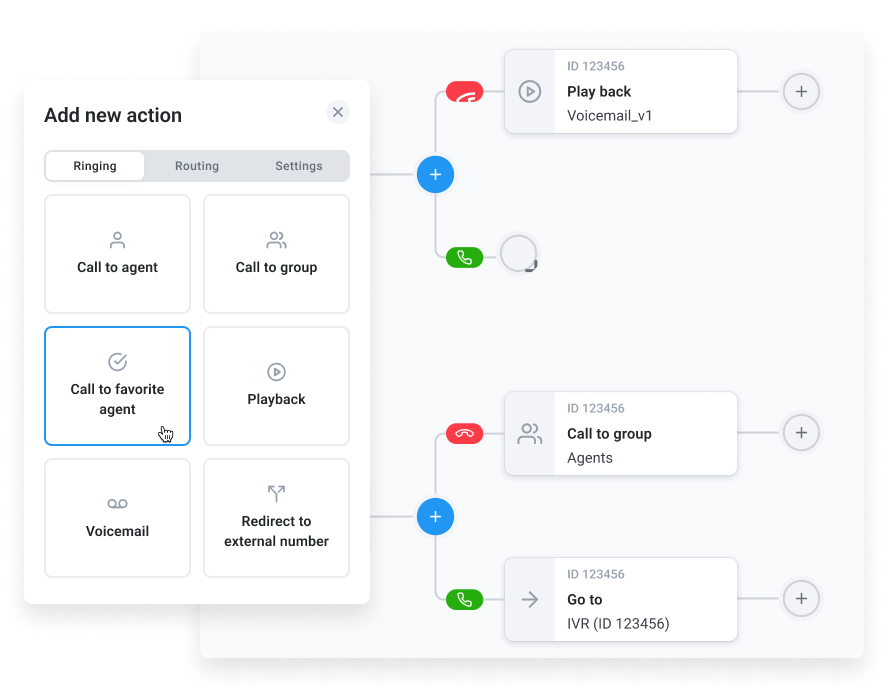
A call flow designer maps how customer calls move through your phone system—from the initial ring to resolution. CloudTalk’s Call Flow Designer lets you visualize, customize, and automate this journey with simple drag-and-drop logic.
Easily configure IVR menus, routing rules, and fallback options to create seamless customer experiences. With a powerful call flow process, you’ll boost satisfaction and team productivity by designing the ideal flow for your business.

How Does Call Flow Designer Work?
Think of a Call Flow Designer like a GPS for your calls. You set the destination—support, sales, voicemail—and build the route using traffic signs like IVR menus, business hours, and call queues.
Each rule you set is like a turn in the road, guiding every caller smoothly to the right place, without detours or delays. Just drag, drop, and define your ideal call route.
Benefits of Call Flow Designer
Design the Way You Talk to Customers
Resolve Calls Faster
Slow response times frustrate customers and cost you deals. A Call Flow Designer routes calls to the right agent straight away. Reduce hold times, avoid dead ends, and help your team solve issues on the first try.
Stop Missing Important Calls
Every missed call is a lost opportunity. With intelligent call flow software, you can route calls even when agents are busy or offline. Making every customer reach someone who can help, right when they need it.
Improve Customer Experience
When calls go to the wrong place, customers get lost. A smart call flow process reduces errors and improves service satisfaction. Guiding clients the right way to feel appreciated and loyal to your business.
Optimize Team Productivity
Constant interruptions damage your team’s productivity. An ideal call flow tool reduces misrouted calls and unnecessary manual handovers. This way, agents focus on high-impact tasks to provide quick and effective support.
How to Set Up CloudTalk’s Call Flow Designer
- 01In your CloudTalk account, go to your dashboard and choose the number you want to configure.
- 02Customize your call settings (internal name, business hours, international calling settings).
- 03Click Configure Call Flow and start adding actions.
- 04Use the + icon to insert steps where needed (Call to agent, Call to group, IVR, Voicemail, etc).
- 05Test and save your call flow.
Features
More Tools to Power the Perfect Call Flow

Call Queuing
Automatically distribute calls to relevant agents based on customer status, technical skills or particular business needs.
Learn more about Call Queuing
Interactive Voice Response
Streamline your callers’ journey with a multi-level IVR menu and lead them where they need to be.
Learn more about Interactive Voice Response
Skill-Based Routing
Assign custom skills to your agents or teams and route customer calls automatically based on their specific expertise.
Learn more about Skill-Based Routing
Caller-Based Routing
Route customers automatically based on factors like agent skills and skill levels, custom fields and even CRM or HelpDesk info.
Learn more about Caller-Based RoutingReady to get started?
Join over 4,000+ modern companies that already trust CloudTalk to have MORE and BETTER calls.
Use CloudTalk’s drag-and-drop Call Flow Designer to build your routing logic in minutes.
A call flow directs incoming calls through a structured path. Ensuring faster routing, fewer errors, and better service.
A call flow is a step-by-step process showing how calls are handled, routed, or resolved within your phone system.
Simply drag elements like welcome messages, rules, and routing blocks in the Call Flow Designer to customize each step.
It automates call handling, saves agents time, and ensures each customer reaches the right place quickly and efficiently.
Typically: Call Start → Greeting → Menu → Routing → Resolution. Each step helps guide callers effectively.
Start → Welcome → Identify need → Route to right agent → Handle issue → End with resolution or follow-up.
Customer calls support, hears a greeting, presses 2 for help, gets routed to a live agent or voicemail if unavailable.
It’s included in all CloudTalk pricing plans at no extra cost.