What is Lead Enrichment: 7-Step Guide for Sales Teams
Lead enrichment turns a basic contact into a sales-ready profile with the extra context your team needs to sell smarter. That matters more than ever because CRM data decays by about 34% a year, 73% of B2B buyers avoid sellers who send irrelevant outreach, and reps still spend 60% of their time on non-selling tasks.
For B2B business, strong enrichment pulls fresh insights from CRM records, buyer signals, firmographic data, and real activity. Then it verifies gaps, prioritizes fit, and routes leads faster.
TL;DR
In this guide, we’ll answer:
- 01Which data points actually help reps close
- 02When to enrich value leads automatically and when human research still wins
- 03How to keep records clean without slowing down sales
- 04What an 8-step lead enrichment looks like in practice
What Is Lead Enrichment?
Lead enrichment is the process of adding useful business context to a raw lead so your team can see who this person is, what company they work for, whether they fit your ideal customer profile (ICP), and how to approach them. In practice, enrichment pulls in missing data like job title, company size, industry, location, tech stack, buying signals, and contact details, then keeps it current through automation and connected tools.
A rep gets a demo request with just a name and work email. That is not enough to write a smart first message. After enrichment, the rep sees the contact is a Head of Marketing at a 200-person SaaS company, the business already uses marketing automation, and the team recently hired SDRs.
Now, instead of sending a generic note, sales can speak to the right pain point, while marketing teams pass over cleaner records that are easier to prioritize.
Some of that context starts forming before a rep ever touches the record. For teams that qualify inbound conversations early, chatbots and virtual assistants can help collect the first useful signals before deeper enrichment begins.
What Are the Benefits of Lead Enrichment?
I’m basing this on current benchmark research, sales intelligence studies, CRM reports, and real lead generation work.
That mix matters for business growth. You get outside proof, practical insights, and a clearer view of what actually helps sales and marketing teams move faster with cleaner data instead of guessing.
Direct Dials Can Increase Live Conversation Rates by Up to 147%
One of the most practical benefits of lead enrichment is direct dial data. When reps get the right number, they skip switchboards and reach buyers faster. Cognism reports direct dials can be 147% more likely to connect than switchboard numbers.
Reps Spend Only 33% of Their Time Actually Selling — Enrichment Fixes That
67% of their time disappears into admin, research, follow-ups, and record cleanup. Weak data slows every stage of the funnel before a real conversation even starts.
Companies using lead enrichment don’t waste time on that. Instead of asking sales to hunt for job titles, company details, and buying context by hand, they give reps a full lead data record upfront. That means faster prioritization, cleaner data handoff from marketing, and more time spent on pipeline-building — one of the clearest benefits in this list, especially in combination with a proper email finder tool that helps to verify new leads and save time.
Personalized Outbound Emails Generate 2x Higher Reply Rates
Customized outbound emails get 10% higher open rates and 2x reply rates compared with generic templates.
When sales team has the right company data context, role details, and buying signals, outreach stops sounding templated. That lead enrichment shift improves trust, gives marketing a clearer path to support the funnel, improves lead qualification, and lifts the odds that prospects actually move toward lead conversion.
Companies Using Lead Scoring See 77% Higher ROI
Companies that use lead scoring see a 77% higher lead generation ROI than those that do not. Scoring turns raw data into action. Instead of pushing every lead into the same queue, sales can focus on accounts with real fit, while marketing stops overfeeding low-potential contacts.
Better lead enrichment gives scoring cleaner inputs, so your tools rank people based on reality, not guesswork.
B2B Contact Data Decays at ~30% Per Year
B2B sales contact data does not stay accurate for long. CRM records degrade by 34% a year without intervention, which means your sales process cannot be a one-time job. Then, deliverability takes the hit.
Validity’s 2025 benchmark report data says higher unknown-user rates damage sender reputation and hurt inbox placement. For sales and marketing, that means missed replies before the conversation even starts. Clean enrichment protects reach.
New Reps Ramp in 3-6 Months. Enriched CRMs Speed That Up
New SDRs typically need about 3.1 months to ramp, while AEs take closer to 4.9 months. Sellers also spend only 30% of the average week actually selling.
An enriched CRM data reduces that drag early. Better lead enrichment gives new sales reps cleaner data, sharper account insights, and fewer blind spots, so they start sounding relevant much faster.
Enriched Data Helps B2B Businesses Shorten the Sales Cycle
More than 75% of organizations said B2B buyers expect faster turnaround and a much higher level of personalization. Forrester’s 2025 Buyers’ Journey Survey also found that 73% of purchases involve three or more departments, with an average of 13 people in the buying group.
That is why lead enrichment matters. Better data helps managers reach the right lead earlier, cut wasted follow-ups, and keep deals moving instead of stalling in research, routing, or misalignment.
How Does Lead Enrichment Work?
Lead enrichment works by taking a raw contact and adding the missing context before the rep makes the call. Think of the lead enrichment process as one connected workflow:
- a new contact lands in the CRM,
- B2B data providers fill gaps in the database,
- intent and company details sharpen the profile,
- then CloudTalk gives the rep the fastest way to act on it inside the same sales pipeline.
A real example is Pipedrive. Their teams use CloudTalk as the calling layer tied directly to Pipedrive, with 100% of call activity automatically logged in the CRM and top SDRs handling 270+ monthly calls with talk-time visibility.
In practice, that means a rep opens one record, sees the B2B data behind the lead, understands likely intent, calls from CloudTalk, and sends the result back for your teams to use next.
That is what makes B2B lead enrichment useful. It turns fragmented information into action. Next, let’s look at the actual types of enrichment data that make this work.
5 Types of Lead Enrichment Data
Lead enrichment gets useful the moment your team stops treating all fields as equal. Some signals tell you whether the person is worth contacting. Others show company fit, buying role, or stack data.
That is why these five categories matter. Together, they turn raw records into sharper insights, and spoiler! technographic data often becomes the piece that makes outreach finally click.
1. Contact Account Data
Contact account data is the practical details a sales team needs to reach someone and place them inside the account correctly.
Good lead data also connects that contact to the right company record, stage, and segment. Useful social media data can add context here too, especially when it shows recent posts, interests, or public pain points.
The next question is not who the person is. It is whether the business behind them actually fits.
2. Firmographic Data a.k.a. Company Data
This is where B2B lead data earns its place. Firmographic data tells you what kind of company you are dealing with:
A perfect contact at the wrong company is still a weak opportunity. Firmographic context helps reps qualify faster. For example, two demo requests come in from Heads of Sales. One works at a 25-person agency. The other is at a 900-person SaaS business hiring across three markets.
Same title. A very different opportunity.
3. Demographic Data
Demographic data tells you how that person fits into the buying process.
A manager usually cares about workflow friction, team output, and daily execution. A director may look at process consistency and performance visibility. A VP starts thinking in terms of cost, scale, and pipeline impact.
4. Technographic Data
It is about which tools, platforms, and systems the account already uses.
The stack context tells the rep whether to lead with integrations, migration pain, consolidation, or adoption speed.
Technographic data helps qualify maturity. Thus, if the account already uses Pipedrive and a basic dialer, the rep can talk about deeper call visibility and efficiency. If they have no structured calling system, the conversation shifts toward process control and missed pipeline opportunities.
5. Behavioral Data
Everything above tells you who the buyer is and where they work. Behavioral data tells you whether they are moving.
Once customer engagement is tied to the record, lead enrichment becomes directional. Sales teams can prioritize the right lead quality instead of treating every record the same. Hiring managers can use automation to trigger follow-ups based on real movement.
In a mature lead enrichment setup, behavior data collection is what helps teams decide not just who fits, but when to act. For example, prospects visit the integrations page on Monday, and check pricing twice on Wednesday.
Those prospects should not stay in a generic nurture flow.
7-Step Workflow for Implementing a Successful Lead Enrichment Program
This is what companies do when they want to implement this system properly: they build enrichment into the real flow instead of treating it like a one-time data cleanup. The goal is simple —turn raw prospects into a data record that marketing teams can qualify, route, and act on faster.
The seven steps below show how to do that in practice.
Define Your ICP Down to the Callable Contact
Start your lead enrichment program with an answer to who you want in the pipeline. Not “mid-market SaaS” level clear. I mean clear enough that a rep can look at a record and know whether this person belongs in outreach, nurture, or nowhere.
Let’s say you are a B2B company selling marketing automation services to ecommerce startups.
Your ICP is never universal. Every company needs its own version based on deal size, sales motion, product complexity, and buying behavior.
It also needs updates when
- your best customers change,
- your product moves upmarket or downmarket,
- buyer intent patterns shift across channels.
Choose Enrichment Tools
The right lead enrichment tools do not just add data fields. They improve call readiness, routing, prioritization, and rep speed. They also help marketing teams capture cleaner information earlier through channels like forms, chatbots, outbound workflows, and CRM syncs.
Lead Enrichment Stack
Don’t copy somebody’s stack data blindly. Your setup needs to match your market, volume, channels, and CRM process. Revisit it when your ICP changes, when you expand into a new segment or geography, and when your lead enrichment data needs move beyond basic contact details.
Set Lead Data Enrichment Triggers
Teams collect data, but they do not define the moments when prospects should be checked, updated, or expanded.
Good lead enrichment works on triggers. That keeps records useful for sales without forcing people to clean fields by hand every time a contact moves.
The right trigger depends on motion.
- A new form fill is an obvious one. So is a booked demo, an inbound chat, or a contact added from an event list.
- In lifecycle programs, marketing may trigger it when a contact returns to pricing pages, opens key emails, or changes company details.
- Periodic automation looks like “refresh records every 60 or 90 days so stale titles”.
Score Every Lead
Once the data is enriched, prospects should get a score based on fit, timing, and action. That score tells sales who deserves a fast call, who belongs in nurture, and who should stay out of the queue for now.
With scoring, lead enrichment becomes operational.
Set the score around three layers:
- Check fit data: company size, role, region, use case.
- Add intent signals like pricing-page visits, demo requests, or repeated engagement.
- Factor in reachability and urgency.
Your enrichment tools should support this logic, while marketing teams keep the rules aligned with pipeline goals.
Automate Lead Routing To The Right Rep
A strong record should not sit in the CRM waiting for someone to decide who owns it. When lead enrichment has clarified fit, territory, urgency, and contact quality, the next move should be immediate. Route the prospects to the rep who can act fastest and handle it best, with the full data needed for a sharp first touch.
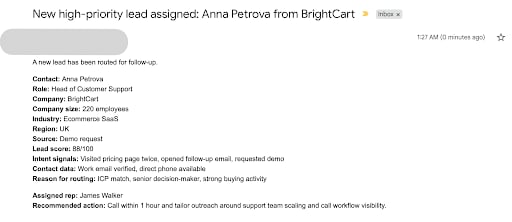
A clean routing setup usually follows fixed rules: segment, geography, language, company size, product line, and inbound source.
Automated routing needs fallback rules: If a rep is offline, overloaded, or misses the response SLA, the lead should be reassigned instantly by territory, segment fit, or queue priority.
Surface Enriched Data at the Moment of the Call
During the call, sales need a few pieces of data that change the conversation.
- First, check buying authority and operational context: role, seniority, team size. That tells the rep whether to speak about daily execution, team performance, cost, or rollout complexity.
- Then look at timing signals. The most useful ones are source, last meaningful touchpoint, recent high-intent page views, prior call notes, open opportunities, and any product or pain-point tags added through lead enrichment.
The point of enrichment is giving the rep a sharper read on why these prospects entered the conversation now.
To Summarize
Lead enrichment works when it helps people move faster, not when it turns your CRM into a storage unit. The point is simple. Give sales the data context they need before the first touch: who this person is, whether the company fits, what signals show intent, and why now.
That is what makes routing sharper, follow-up faster, and outreach less generic.
Start with one narrow motion. Pick one lead source, define the data fields that actually affect action, connect the right tools, and build the process there. Then scale what proves useful.
About the Author

Juliia Serdiuk is Head of Outreach @ HelpCrunch
External Partner