
TL;DR: 10 Best Alternatives to Grasshopper in 2026
| # | Platform | Best for | Starting Price (annual billing) | G2 Rating |
|---|---|---|---|---|
| 1 | CloudTalk | Scaling, global SMB sales & support teams | $19/user/mo | 4.4/5 |
| 2 | JustCall | High-volume text messaging | $29/user/mo | 4.3/5 |
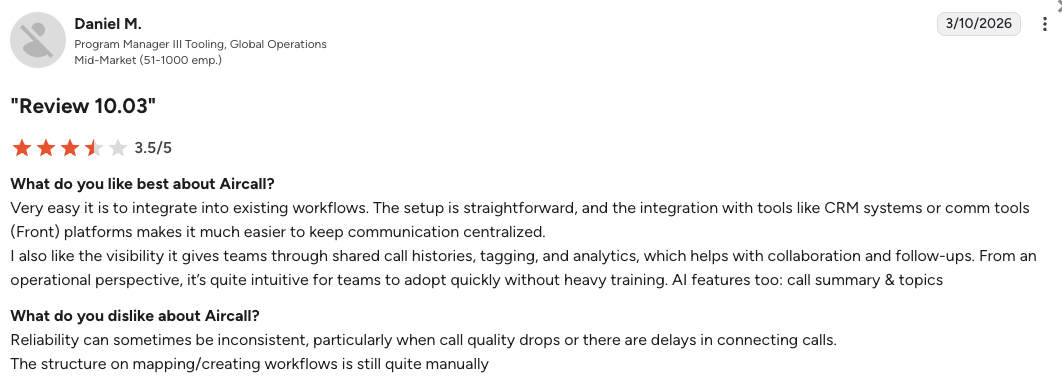
| 3 | Aircall | App ecosystem integrations | $30/user/mo | 4.4/5 |
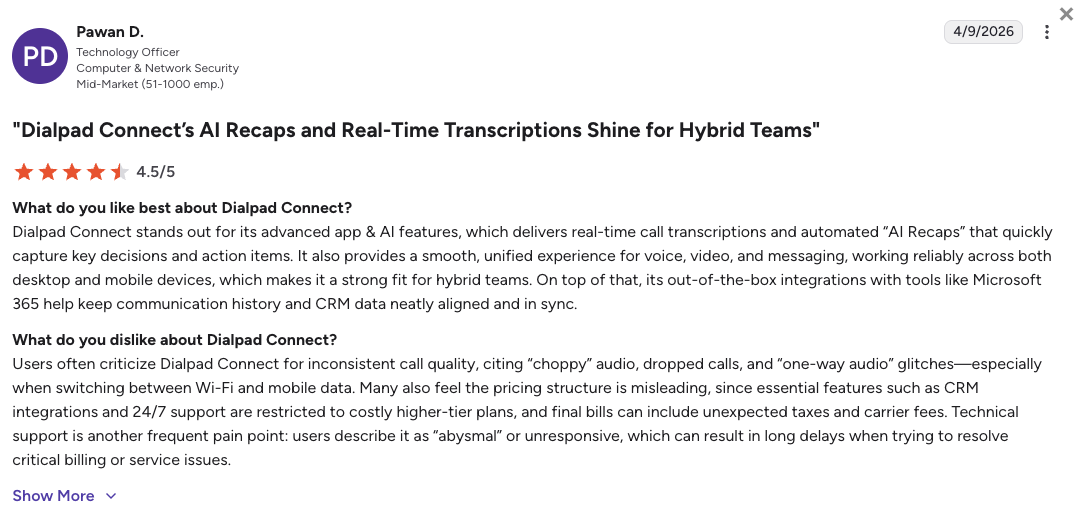
| 4 | Dialpad | AI-centric mid-market teams | $15/user/mo | 4.4/5 |
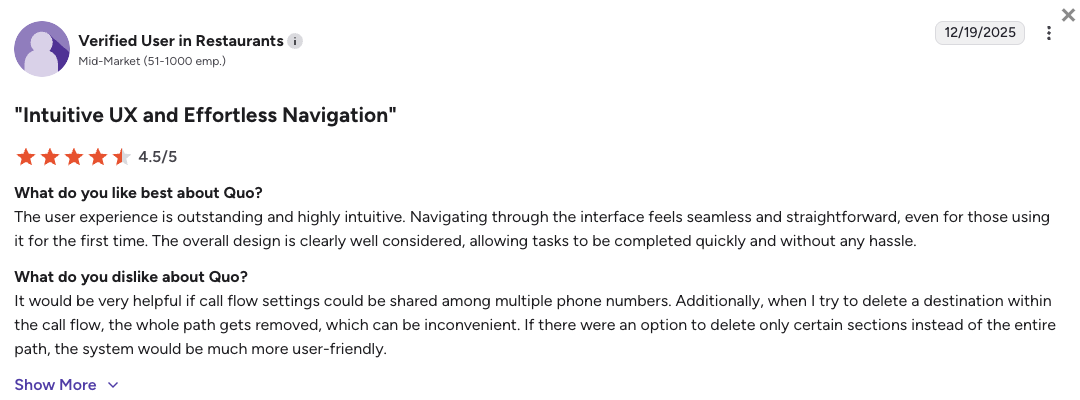
| 5 | Quo (OpenPhone) | Shared inboxes for micro-teams | $15/user/mo | 4.7/5 |
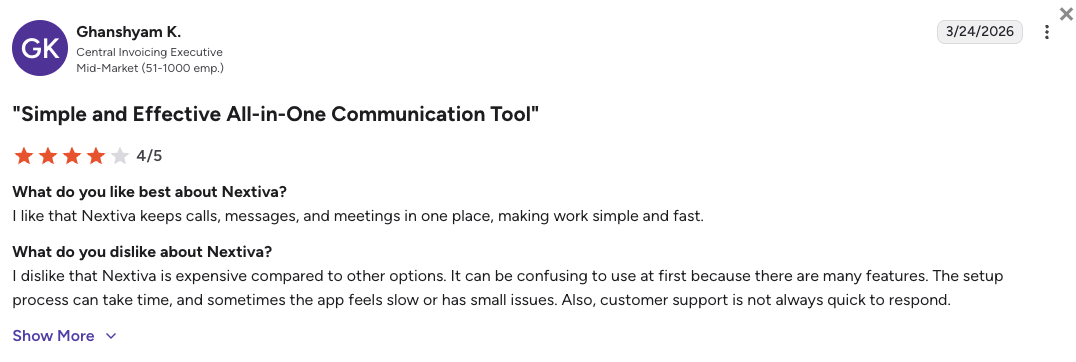
| 6 | Nextiva | Reliable unified communications | $15/user/mo | 4.5/5 |
| 7 | Zoom Phone | Teams inside the Zoom ecosystem | $10.50/user/mo | 4.6/5 |
| 8 | GoTo Connect | Seamless upgrade for Grasshopper users | $26/user/mo | 4.4/5 |
| 9 | RingCentral | Heavy enterprise deployments | $20/user/mo | 4.2/5 |
| 10 | Google Voice | Bare-minimum utility | $10/user/mo | 4.1/5 |
Skip the reading. See it live.
Why Are Teams Searching for a Grasshopper Alternative?
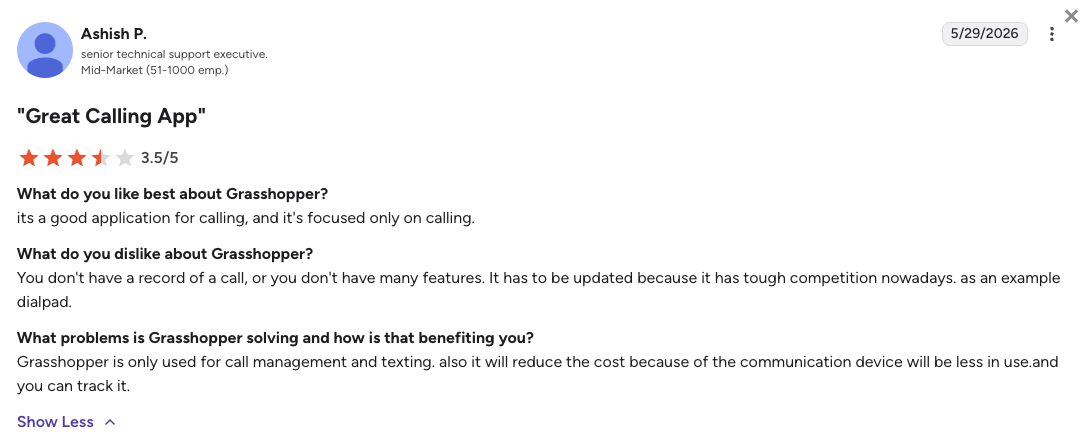
Teams quickly outgrow Grasshopper when they realize its complete lack of software connections and rigid design actively choke daily production. Finding an upgraded service that unifies your data and workflows is mandatory if your goal is sustainable company growth.
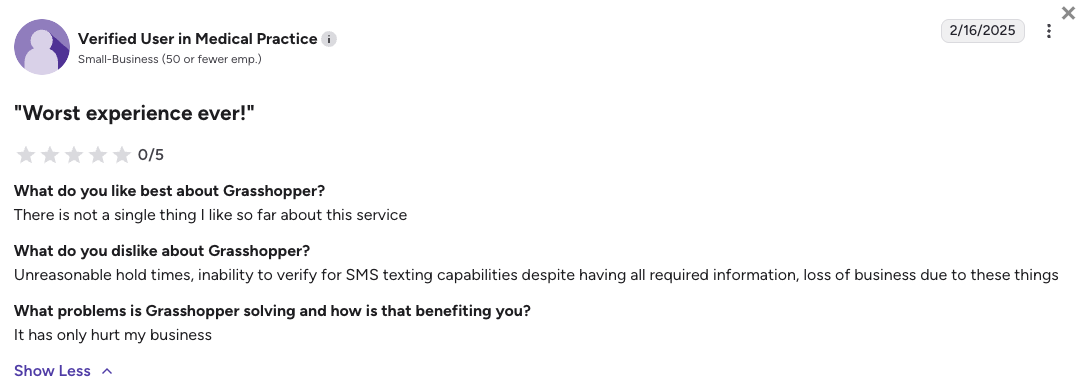
While Grasshopper's entry pricing of just $14/mo looks highly appealing for standard startups, the real costs of manual tracking and system bugs quickly destroy those savings. Based on verified G2 reviews (where Grasshopper scores a low 3.9/5), users typically leave the platform due to five massive operational landmines.
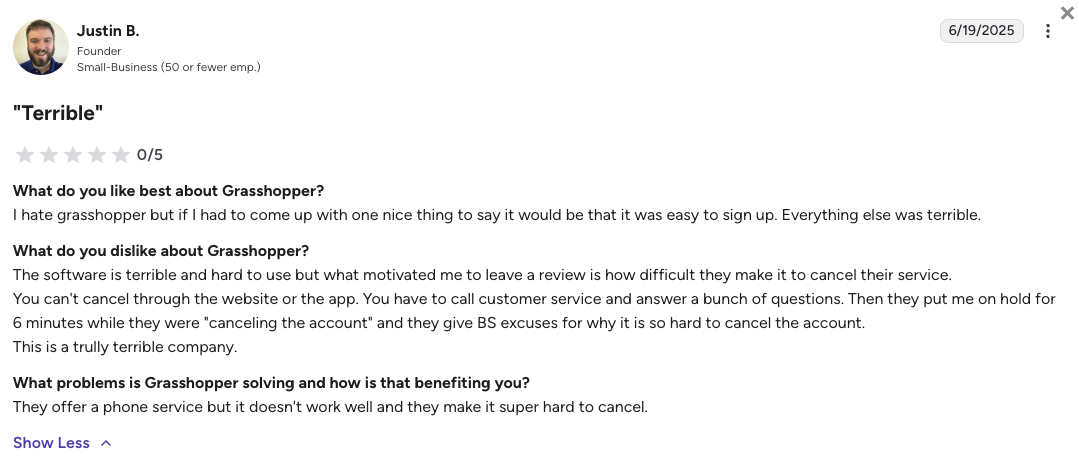
5 Main Cons of Grasshopper That Make Growing Teams Leave
- Unexpected A2P registration fees:Automated system bugs often trap businesses in a broken text verification cycle. Every failed attempt triggers a surprise $4.50 penalty fee that quietly inflates your bill.
- Total data isolation from your CRMs:Grasshopper offers zero native API connections to modern platforms like Salesforce, HubSpot, or Zendesk. This forces your busy representatives into hours of tedious manual data entry just to keep basic client timelines updated.
- Interactive phone menus kill your text messaging:Setting up an interactive voice routing menu on your main business line instantly disables that specific line from sending or receiving texts. Your customers will try to text your office, but their messages fail silently without any automated error responses.
- Long delays when transferring numbers or canceling:Moving your numbers away from Grasshopper is a notoriously slow process that can take weeks to resolve. The platform frequently refuses to offer prorated refunds during this transition, forcing you to pay for overlapping billing cycles.
- Strict limits on international growth:Outbound calling is strictly limited to North America unless you agree to highly expensive metered rates. You also cannot natively buy and deploy international virtual numbers to build a trusted local presence overseas.
What Is the Best Alternative to Grasshopper?
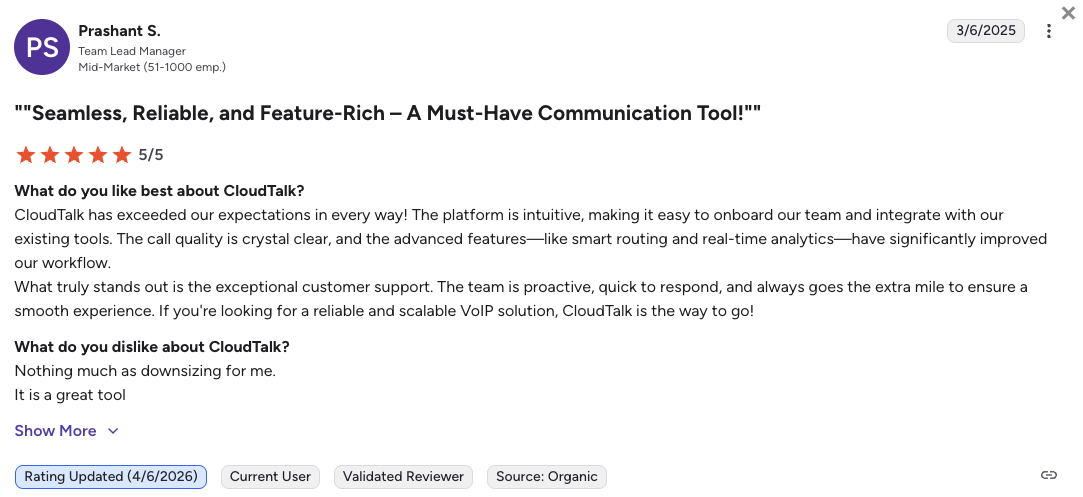
CloudTalk is the best alternative to Grasshopper for scaling sales and support floors (SMB & mid-market). With transparent pricing starting at just $19/user/month, CloudTalk serves as a highly reliable, automated growth engine for your daily communication needs.
CloudTalk is better than Grasshopper because it completely solves the headache of manual data tracking by providing instant, two-way CRM syncing. Instead of managing static, isolated numbers that lose text capabilities when you add an auto-attendant, CloudTalk keeps all systems fully unified. Every call log, recording, and message auto-populates inside your business software, saving your reps hours of administrative labor.
Why Do Teams Consider CloudTalk the Best Grasshopper Alternative?
5 Main Pros of CloudTalk: Based on Real User Experience
- Massive International Reach:Grasshopper locks your growth inside the US and Canada. CloudTalk uses an elite multi-carrier setup to let you deploy local, mobile, and toll-free lines in 160+ countries, with flawless audio clarity.
- Advanced Auto-Dialers:Stop typing phone numbers manually. CloudTalk offers native Preview, Smart, and Power dialers on the Expert plan, and a multi-line Parallel dialer as a paid add-on. These auto-dialing modes will help you maximize connection rates and lower agent idle time.
- Automated CRM Syncing:CloudTalk breaks down data silos by feeding information directly into tools like HubSpot (available on the Essential plan) or Salesforce (available on the Expert plan) in real time, ensuring your customer records stay accurate at all times.
- Fully Autonomous 24/7 AI Agents:Move past simple voice messaging. CloudTalk lets you deploy conversational AI Voice Agents fluent in 60+ languages to handle routine lead qualification and support queries at highly efficient, flat-minute rates.
- Painless Onboarding & Human Support:Never get stuck talking to an automated chat robot when your lines go down. CloudTalk provides a streamlined onboarding and fast, live access to real human technical experts who keep your team connected.
Ready to leave unexpected fees and manual logging behind?
How We Tested & Rated the Best Grasshopper Alternatives 2026
To pinpoint the top alternatives to Grasshopper, we deep-dived into real user discussions, pricing fine print, and feature metrics across G2, Trustpilot, Reddit, and Quora. We focused exclusively on locating VoIP systems for growing teams that fix the exact problems Grasshopper users struggle with most.
Our evaluation focused on six core pillars essential for scaling a business:
- Network Stability: We analyzed server uptimes and carrier network designs to eliminate dropped connections and audio latency bugs.
- CRM Deep-Sync: We prioritized platforms that feature true bi-directional data syncing, entirely removing manual data entry.
- Dialing Speed: We looked for built-in automation like click-to-call links and automatic dialer systems to accelerate outbound outreach.
- AI Productivity: We evaluated modern tools like automated conversation summaries, live coaching cues, and fully autonomous voice bots.
- Support Response: We strongly favored platforms that offer dedicated human technicians over those that rely on community forums.
- Total Cost of Ownership (TCO): We audited pricing models to catch hidden carrier compliance markups, seat minimums, or mandatory feature add-on fees.
The Top 10 Alternatives to Grasshopper for 2026
Before we explore the individual brand breakdowns, check this quick matrix to see how the top Grasshopper competitors stack up across pricing, scaling limits, and advanced features.
Grasshopper Competitors Compared
| Feature | Grasshopper | CloudTalk | JustCall | Aircall | Dialpad |
|---|---|---|---|---|---|
| Starting Price (Annual) | $14/mo (Flat) | $19/mo | $29/mo | $30/mo | $15/mo |
| Minimum Seats | 1 User | 1 User | 2 Users | 3 Users | 1 User |
| Outbound Dialers | Manual pad only | Preview, Smart, Power (Expert plan) + Parallel (add-on) | Power, Predictive, Dynamic | Power Only (Tier-locked) | Power Only (Paid module) |
| Native CRM Sync | No | Yes (Two-way) | Yes (Two-way) | Yes (Two-way) | Yes (Two-way) |
| 24/7 AI Voice Agents | No | Yes (Available as add-on bundles) | Yes (High-tier add-on) | Yes (Add-on required) | Yes (Credit-based model) |
| Local Numbers | US/CA Only | 160+ Countries | 70+ Countries | 100+ Countries | 70+ Countries |
| Free Trial | 7 Days | 14 Days | 14 Days | 14 Days | 14 Days |
How much does Grasshopper cost?
Grasshopper looks highly economical on paper, but its lack of automation drains your real revenue. When your expensive sales reps waste hours every week typing out call notes and manually dialing prospects, your growth stalls. CloudTalk eliminates this friction entirely, ensuring maximum financial return by letting your agents focus exclusively on closing active deals.
1. CloudTalk: The Best Grasshopper Alternative for Scaling SMB Sales & Support Teams
What Is CloudTalk?
CloudTalk is an AI-powered, cloud-based phone system designed specifically for fast-growing sales and customer support teams. The software acts as an all-in-one calling engine that replaces out-of-date forwarding setups with real telecom stability.
CloudTalk fits perfectly into the SMB and mid-market space, giving your office advanced productivity features without the heavy IT setup. Read on and learn why CloudTalk is trusted by 4,000+ businesses worldwide.
Why Is CloudTalk a Strong Grasshopper Alternative?
- Safe from text compliance traps: Grasshopper often hits you with surprise fees and verification failures for your business texts. CloudTalk gives you a clear onboarding process and live support to keep your text campaigns safe and fully compliant.
- Unbroken phone menus and texting: Turning on an interactive routing menu on Grasshopper completely breaks your text channel. CloudTalk uses a visual Call Flow Designer that lets you guide callers with a helpful menu while keeping your texting perfectly active on that same number.
- Zero manual logging with deep CRM sync: Instead of forcing your reps to type notes into empty records, CloudTalk integrates directly with HubSpot and Salesforce (and 100+ other popular CRM tools). Every conversation logs automatically, saving your team hours of boring database entry.
- True international footprint: Grasshopper locks your calling options inside North America. CloudTalk uses an elite multi-carrier network to let you buy local, mobile, and toll-free numbers in over 160 countries with crystal-clear audio quality.
- Autonomous 24/7 AI Voice Agents: While Grasshopper ignores artificial intelligence completely, CloudTalk lets you offload routine calls to next-gen AI voice agents and AI receptionists through flexible add-on packages.
What Are the Pros & Cons of CloudTalk?
| Pros | Cons |
|---|---|
| Flawless database connections: Auto-syncs all calls and messages with popular business apps. | No native video meetings: You will need a separate app like Google Meet or Zoom for video calls. |
| Massive country coverage: Local numbers in 160 countries help you build fast global trust. | Base tier boundaries: The cheapest plan limits outbound calling mostly to regional destinations. |
| Smart outbound dialers: Built-in systems like Power and Smart dialers double your daily sales volume. | Parallel dialer: Dialing several numbers at the exact same time requires a paid add-on. |
| Predictable AI add-ons: Flat monthly rates for transcripts mean no surprise per-minute bills. | |
| Enterprise carrier network: A premium architecture prevents the conversation drops. |
What Are CloudTalk's Plans & Pricing?
CloudTalk pricing starts at $19/user/month (billed annually), with the following plans:
- Lite - $19/user/month
- Starter - $25/user/month
- Essential - $29/user/month
- Expert - $49/user/month
- Custom - Quote-based pricings
Scale your revenue, not admin:
Basic systems seem cheap until you calculate the wasted payroll hours. CloudTalk's Essential tier automatically updates your CRM in the background, giving your reps hours back every week to actually sell.
What Are CloudTalk Customers Saying?
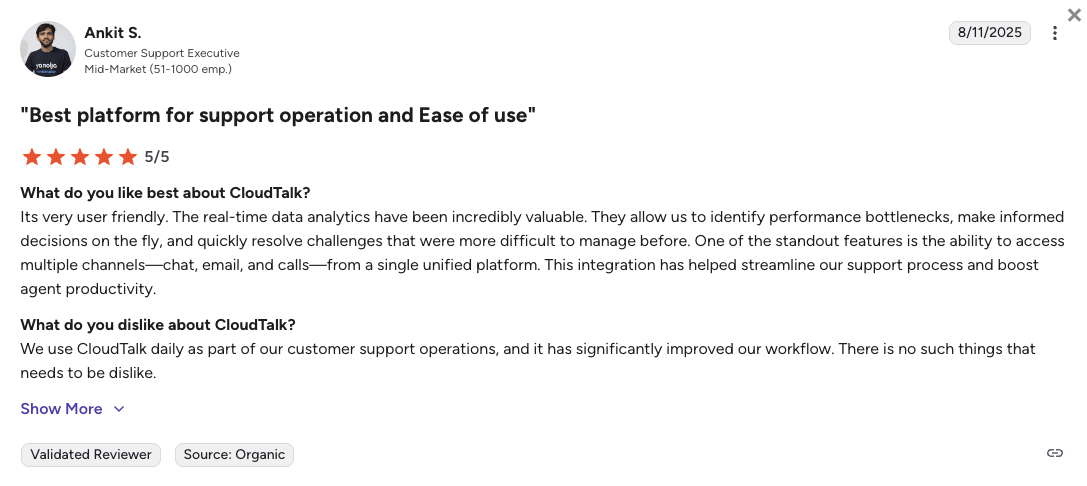
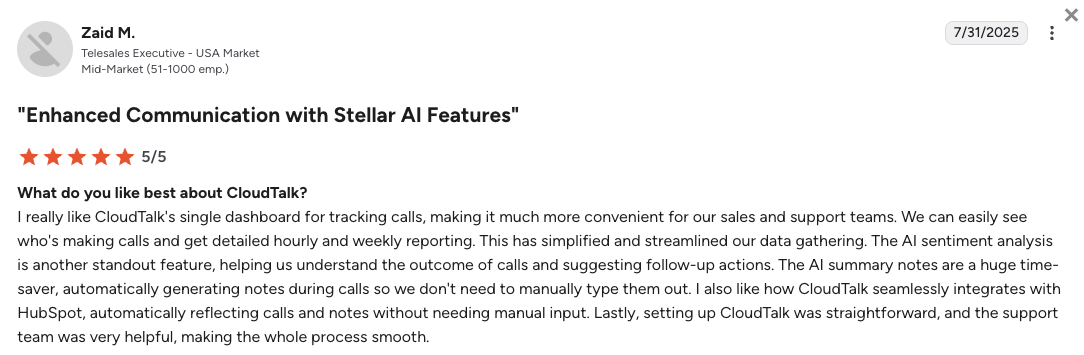
Managers who move to CloudTalk talk about how much admin work they save and praise the massive jump in overall call stability.
- Crystal clear audio: Reviewers say the carrier network completely stops the voice lag and dropped lines common on older systems.
- Zero admin friction: Support leads appreciate that all client messages and transcripts land perfectly in their central database automatically.
- Minor busy hour delays: A few users mention that reaching a live chat technician during peak morning hours can sometimes take a few extra minutes.
How G2 Users Rate CloudTalk?
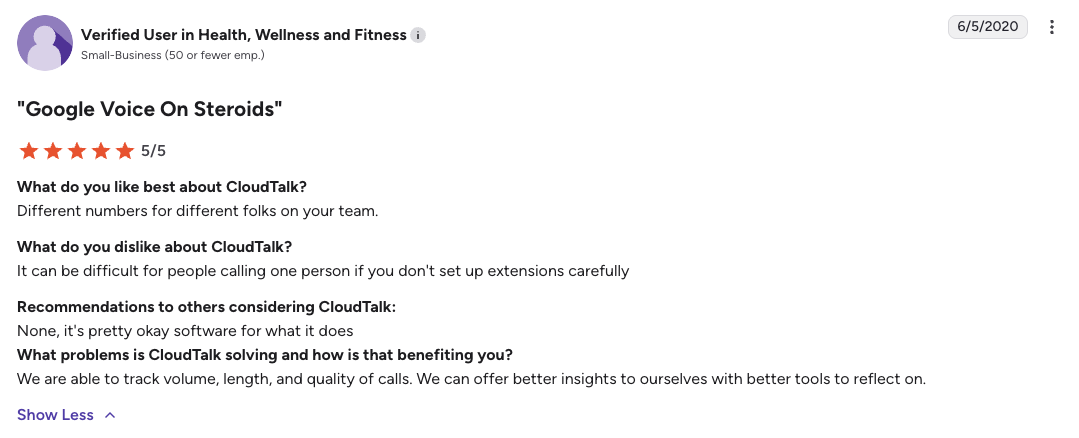
CloudTalk’s current G2 rating is 4.4/5, out of 1,800+ verified user reviews.
Ready to trade operational landmines for actual growth?
2. JustCall: Best for High-Volume Text Messaging
What Is JustCall?
JustCall is a cloud business phone system tailored for text-heavy sales development and customer outreach teams. The software functions mainly as an active message delivery tool that wraps directly around your existing customer records. JustCall serves small to mid-sized offices that prioritize automated bulk texting campaigns over deep, multi-layer voice routing.
Why Is JustCall a Strong Grasshopper Alternative?
- Large text message allowances: Grasshopper traps users in constant compliance and message failure loops. JustCall packs a dedicated text segment allowance directly into its core tiers to protect your bulk campaigns from random delivery bans.
- Automated sales outreach dialers: Instead of your agents typing numbers into a dial pad one by one, JustCall includes progressive auto-dialers. This speeds up your daily prospect queues significantly compared to Grasshopper's manual setup.
- Direct customer database updates: JustCall auto-logs text chains and outbound dials into your company software, curing the isolated data problem that forces Grasshopper users to copy and paste notes.
What Are the Pros & Cons of JustCall?
| Pros | Cons |
|---|---|
| Fast text message sequences: Automates bulk messaging campaigns to scale your brand awareness easily. | Mandatory user minimums: A strict two-user baseline requirement doubles the starting bill for solo operators. |
| Clean desktop dialer window: Keeps customer context on screen so agents know who they are calling. | Unpredictable AI invoices: Standing up smart voice bots can trigger surprise per-minute usage bills. |
| Good CRM connectivity: Syncs calls cleanly with tools like Pipedrive and HubSpot right out of the box. | Expensive number bundles: Adding local outbound presence packages requires a high monthly surcharge. |
What Are JustCall’s Plans & Pricing?
JustCall pricing starts at $29/user/month (billed annually, 2-user minimum), with the following plans:
- Team - $29/user/month
- Pro - $49/user/month
- Pro Plus - $89/user/month
- Business - Custom quote-based pricing
AI costs down the road:
Be cautious with JustCall’s lower tiers. While the software offers great AI voice agents, they are often billed separately on a pay-as-you-go basis (like $0.99 per minute), creating highly unpredictable monthly invoice.
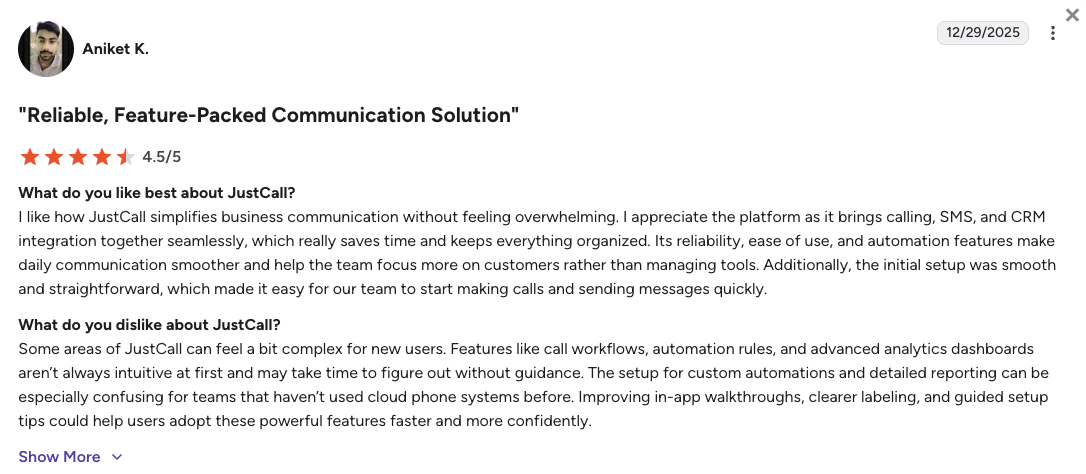
What Are JustCall Customers Saying?
Outreach teams appreciate the speed of JustCall’s texting modules, but some point out issues when run under full load.
- Excellent message delivery: Users note that business texts bypass standard carrier blocks safely.
- Simple data matching: Reps love that outbound call histories update their CRM records instantly.
- Occasional system freezes: Technical reviews flag that the interface can lag when running massive concurrent messaging lists.
How G2 Users Rate JustCall?
JustCall's current G2 rating is 4.3/5, out of 2,300+ verified user reviews.
3. Aircall: Best for App Ecosystem Integrations
What Is Aircall?
Aircall is a polished, software-centric phone platform known for its minimalist dashboard and large application marketplace. The software is engineered primarily for modern, remote support teams that want their calling window to live inside their helpdesk screens. Aircall serves fast-growing tech teams and helpdesks that handle large volumes of inbound customer conversations.
Why Is Aircall a Strong Grasshopper Alternative?
- Adding new users instantly: Instead of dealing with slow identity checks and clunky dashboards, Aircall lets you set up new international lines and assign them to employees in minutes.
- User-friendly app onboarding: New customer service hires can master the Aircall interface instantly, eliminating the learning curve tied to older phone software.
What Are the Pros & Cons of Aircall?
| Pros | Cons |
|---|---|
| Clean embedded workspace: Eliminates tab switching by running your phone layout inside your helpdesk app. | High price of entry: A strict three-user account minimum blocks out smaller startups. |
| Intuitive routing setup: Lets you adjust your ring rules quickly using a modern graphical setup. | Gated dialing automation: You cannot access the outbound Power Dialer unless you pay for top-tier plans. |
| Excellent partner ecosystem: Syncs cleanly with niche software solutions that other providers ignore. | Costly AI upgrades: Basic call transcripts and summaries require an expensive monthly add-on fee. |
What Are Aircall’s Plans & Pricing?
Aircall pricing starts at $30/user/month (billed annually, 3-user minimum), with the following plans:
- Essentials - $30/user/month
- Professional - $50/user/month
- Custom - Quote-based pricing
The 3-license entry floor:
Keep in mind that Aircall enforces a mandatory three-user minimum. Even if you are a team of one or two, your opening monthly bill will be at least $90.
What Are Aircall Customers Saying?
IT managers using Aircall like how easily the system plugs into existing support stacks, though desk teams note a drop in live assistance response times.
- Zero-effort software links: Users love how seamlessly the phone app displays customer notes during live help calls.
- Beautiful layout design: Admins report that employees adapt to the calling app with almost zero technical training.
- Tiered support restrictions: Baseline plan users must rely on standard ticket lines rather than priority live channels during peak hours.
How G2 Users Rate Aircall?
Aircall's current G2 rating is 4.4/5, out of 1,500+ verified user reviews.
4. Dialpad: Best for AI-Centric Mid-Market Teams
What Is Dialpad?
Dialpad is a modern UCaaS (Unified Communications as a Service) platform built around real-time speech recognition and intelligence tracking. The platform serves data-driven mid-market operations that want automated software to score human calls while they happen. A great benefit of Dialpad is that it unifies corporate voice, video meetings, and internal team chat into one interface.
Why Is Dialpad a Strong Grasshopper Alternative?
- Live on-screen agent coaching: Grasshopper offers zero conversation insights. Dialpad transcribes your calls live, instantly popping up helpful training cards on screen if a client mentions a tough question.
- Native call transcripts from day one: Instead of reading simple voicemail text blocks, Dialpad creates rich, searchable word transcripts for every completed business conversation automatically.
- Unbroken messaging and ring groups: Dialpad lets you construct multi-step employee call groups and auto-attendants without disabling your text messaging channel.
What Are the Pros & Cons of Dialpad?
| Pros | Cons |
|---|---|
| Highly accurate live notes: Automatically tracks action items and user sentiment during conversations. | Split sales and support products: You can’t upgrade your plan to get dialers or call queues. You need entirely different Dialpad software. |
| No forced seat minimums: Single operators can use the core AI tiers without added license penalties. | Confusing AI billing: The new conversational AI tools rely on a complicated, credit-based usage matrix. |
| Unified chat and video: Combines internal team channels and external lines inside one app. | Expensive toll-free setups: High volumes of inbound customer toll calls can escalate your monthly bill quickly. |
What Are Dialpad’s Plans & Pricing?
Dialpad pricing starts at $15/user/month (billed annually), with the following plans:
- Standard - $15/user/month
- Pro - $25/user/month
- Essentials - $39/user/month
- Advanced - $95/agent/month (ideal for contact centers)
The contact center product trap:
Be aware that advanced support queues, shared company hold lines, and deep analytics require buying specialized Dialpad Support or Dialpad Sell products, where single seats quickly cross $80 per month.
What Are Dialpad Customers Saying?
Corporate operators praise the accuracy of Dialpad’s post-call AI summaries, but growing managers feel limited by feature gatekeeping.
- Incredible meeting notes: Teams value the automated summaries that extract action points perfectly.
- Polished multi-device app: Users like how smoothly the call window jumps between mobile phones and laptops.
- Unexpected pricing tier upgrades: Support leaders express frustration when forced onto enterprise plans just to get basic call queues.
How G2 Users Rate Dialpad?
Dialpad’s current G2 rating is 4.4/5, out of 4,000+ verified user reviews.
5. Quo (OpenPhone): Best for Shared Inboxes and Micro-Teams
What Is Quo?
Quo, recently rebranded from OpenPhone, is a collaborative digital workspace that visualizes business phone lines as shared team inboxes. The software caters explicitly to early-stage startups, small agencies (especially real estate), and micro-teams that handle customer communication via text message. Quo is a good solution for businesses that need their telephone logs, voicemails, and chat histories organized in one unified space.
Why Is Quo a Strong Grasshopper Alternative?
- True team number sharing: Grasshopper locks lines down to single user profiles. Quo enables multiple teammates to read, write, and dial from the exact same business line at the same time.
- Modern visual inbox layout: Instead of navigating an old Web 2.0 menu layout, Quo provides a conversational feed that looks and feels exactly like a smartphone text app.
- Work and personal life separation: Quo’s mobile app clearly labels incoming business dials on your personal cell phone screen, keeping your private number protected without complex hardware.
What Are the Pros & Cons of Quo?
| Pros | Cons |
|---|---|
| Shared thread spaces: Allows reps to work together on customer conversations without duplicating text replies. | Strict outbound policing: Hypersensitive spam filters can abruptly freeze accounts doing normal cold outreach. |
| No user license penalties: Solo operators can sign up instantly without being forced into multi-seat plans. | No built-in sales dialers: Lacks any automated Power or Predictive dialers for fast outbound calling. |
| Unlimited regional messaging: Includes unrestricted text messaging across the United States and Canada. | North American core boundaries: International telephone numbers and global calling cost extra. |
What Are Quo’s Plans & Pricing?
Quo pricing starts at $15/user/month (billed annually), with the following plans:
- Starter - $15/user/month
- Business - $23/user/month
- Enterprise - Custom quote-based pricing
Geographic limits:
While regional texting is included, global operations should note that calling overseas requires buying separate, prepaid per-minute voice credits.
What Are Quo Customers Saying?
Text-heavy agencies love the look and feel of Quo’s workspace, but bulk marketing teams warn about unexpected system blocks.
- Beautiful user interface: Reps frequently say the design requires zero training and feels completely natural.
- Excellent context sharing: Support teams love seeing when another employee is actively typing a customer message.
- Sudden text message blocks: Users on Reddit state that the backend system can flag regular customer updates as spam, closing accounts without warning.
How G2 Users Rate Quo?
OpenPhone’s current G2 rating is 4.7/5, out of 3,000+ verified user reviews.
6. Nextiva: Best for Reliable Unified Communications
What Is Nextiva?
Nextiva is a large, enterprise-grade UCaaS provider built for traditional businesses that need high network availability. The platform merges high-uptime cloud voice, corporate video conferencing, and internal document collaboration tools into one secure portal. Nextiva serves established multi-site companies, medical centers, and legal firms that require medical-grade privacy compliance.
Why Is Nextiva a Strong Grasshopper Alternative?
- High platform stability: Grasshopper frequently suffers from voice lag and app instability. Nextiva backs its system with a certified 99.999% uptime guarantee, preventing dropped connections.
- Full security and legal compliance: Unlike Grasshopper, Nextiva is fully HIPAA compliant. They happily sign Business Associate Agreements, making them safe for healthcare and financial offices.
- All-in-one calling and video: Nextiva bundles high-definition video meetings natively into its core plans, saving you from paying for separate Zoom or Microsoft Teams accounts.
What Are the Pros & Cons of Nextiva?
| Pros | Cons |
|---|---|
| Rock-solid voice connections: Built on highly stable architecture to guarantee crisp phone lines. | Dated control portal: The management dashboard looks old and requires several clicks to adjust simple rules. |
| Responsive human support: Features live tech experts over the phone to fix your system routing issues fast. | High price for full metrics: Advanced contact center tracking requires moving to expensive premium plans. |
| Generous core text limits: Includes large text messaging volume pools to stop mid-month service freezes. | Slower system onboarding: Setting up the enterprise voice routing tree takes a bit more time and technical effort. |
What Are Nextiva’s Plans & Pricing?
Nextiva pricing starts at $15/user/month (billed annually), but to get even basic call center capabilities, you’ll need the $25/mo Engage plan. Here’s the full breakdown:
- Core - $15/user/month
- Engage - $25/user/month
- Scale - $75/user/month (Contact center features)
- Professional - Quote-based (Enterprise plans)
The setup learning curve:
Because Nextiva provides professional enterprise infrastructure, configuring your team's routing paths and user permissions will require more technical effort than setting up a simple mobile app.
What Are Nextiva Customers Saying?
Business operators love Nextiva’s stability, but modern startups find the backend interface hard to manage.
- Unbeatable network uptime: Users write that their phone connections stay clear and active all year long.
- Fantastic phone technicians: Admins praise the support staff for patiently troubleshooting complex office call flows.
- Clunky user settings: Reviewers note that changing user extensions or auto-attendant schedules feels slow and confusing.
How G2 Users Rate Nextiva?
Nextiva’s current G2 rating is 4.5/5, out of 3,400+ verified user reviews.
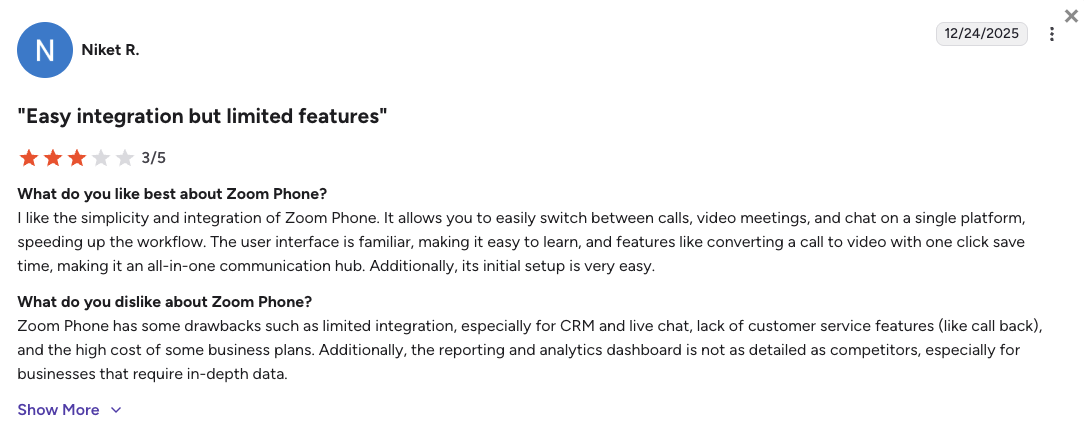
7. Zoom Phone: Best for Teams inside the Zoom Ecosystem
What Is Zoom Phone?
Zoom Phone is a business phone system built directly into the Zoom app. If your team already spends half their day on Zoom video calls, this gives them an easy way to make regular phone calls without learning new software. Zoom Phone is a perfect fit for companies looking to combine their phone and video bills into a single invoice.
Why Is Zoom Phone a Strong Grasshopper Alternative?
- Zero employee learning curve: Your desk reps don’t need to install or learn a new piece of phone software. The dialer appears naturally inside the Zoom dashboard they open every day.
- Instant call-to-meeting elevation: If a routine call gets complicated, Zoom Phone lets you transition it to a full multi-user video meeting with one click.
- Consolidated software management: Zoom Phone allows your tech managers to oversee internal team chats, meeting links, and business phone numbers under one dashboard.
What Are the Pros & Cons of Zoom Phone?
| Pros | Cons |
|---|---|
| Frictionless adoption: Running inside a familiar video application eliminates the need for software training. | Lacks deep sales tools: Not built for high-volume outbound dialing or complex CRM workflows. |
| Low cost of entry: Exceptionally cheap to add on if you already pay for Zoom Workspace. | Metered base plan trap: The cheapest entry plan charges your business per minute for every outgoing call. |
| Stable global network backbone: Uses massive video server networks to deliver low-latency audio lines. | Basic support metrics: Data reporting is too simple to effectively manage a busy customer helpdesk floor. |
What Are Zoom Phone’s Plans & Pricing?
Zoom Phone pricing starts at $10.50/user/month (Metered, billed annually), with the following main plans:
- US & Canada Metered - $10.50/user/month (Phone, pay-per-minute for outgoing calls)
- US & Canada Unlimited - $16/user/month (Phone, flat rate)
- Pro Plus - $20.50/user/month (Workplace)
- Business Plus - $24.50/user/month (Workplace)
Metered vs. unlimited plans:
Zoom Phone’s $10.50 starting price is highly attractive, but it means you are billed per minute for every call you make. If your team is frequently on the phone, the $16 Unlimited plan is actually much cheaper in the long run.
What Are Zoom Phone Customers Saying?
Zoom Phoen admins enjoy the convenience of the single combined layout, though outbound sales groups find it too basic.
- Flawless video transitions: Reps love moving a customer from a voice line to a screen share instantly.
- Excellent voice performance: Users note that audio rarely lags or breaks up during important corporate calls.
- Too simple for prospecting: Sales leaders state that the application lacks the complex auto-dialers and deep CRM tracking they need to hit high targets.
How G2 Users Rate Zoom Phone?
Zoom Phone’s current G2 rating is 4.6/5, out of 2,600+ verified user reviews.
8. GoTo Connect: The Logical Internal Ecosystem Upgrade
What Is GoTo Connect?
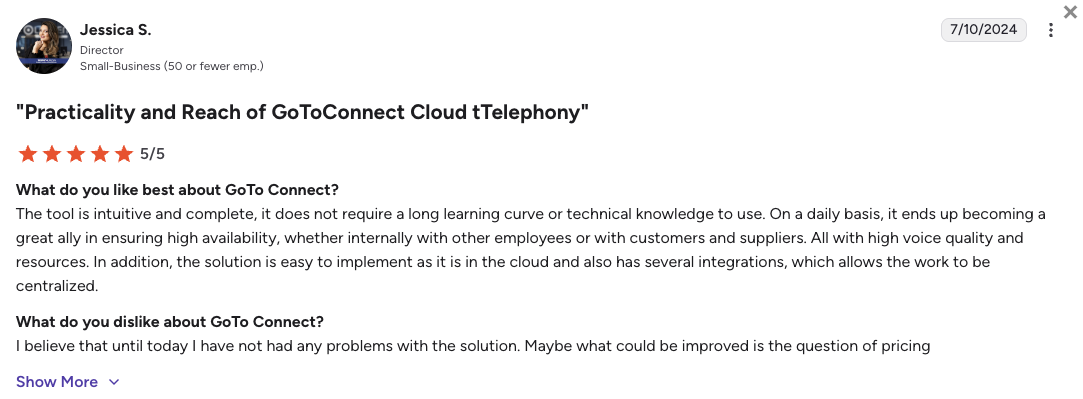
GoTo Connect is a feature-rich cloud business phone and meeting suite built explicitly for fast-growing companies that need solid internal controls. Given that GoTo owns both platforms (yes, Grasshopper belongs to the GoTo group), GoTo Connect serves as the official upgrade path for businesses graduating from Grasshopper's small forwarding limits. GoTo Connect scales comms across mid-market teams needing multi-level auto-attendants and visual call builders.
Why Is GoTo Connect a Strong Grasshopper Alternative?
- Painless data and billing migration: Because it lives inside the same parent brand ecosystem, moving your existing telephone lines away from Grasshopper happens instantly without long porting delays.
- True multi-level call routing: Grasshopper limits you to basic single-layer forwarding steps. GoTo Connect includes a visual drag-and-drop routing planner to map out more complex queues.
- Built-in corporate video packages: GoTo Connect includes high-capacity company video conferencing and screen sharing tools, features completely absent on Grasshopper's virtual lines.
What Are the Pros & Cons of GoTo Connect?
| Pros | Cons |
|---|---|
| Visual call flow design: Simple drag-and-drop map maker lets you customize your business call paths quickly. | Steep pricing jumps: Unlocking essential integrations and AI tools requires moving to much more expensive tiers. |
| Smooth account transition: Migrates your current numbers inside the parent network with zero downtime. | Bloated administrative panel: The back-end dashboard packs too many options, making edits feel slow. |
| Unlimited global destinations: Includes unrestricted voice calling to over 50 countries on top tiers. | Heavy internet bandwidth needs: The desktop application requires strong web connections to stop voice distortion. |
What Are GoTo Connect’s Plans & Pricing?
GoTo Connect pricing is hidden behind "Contact Sales" buttons, but industry data and verified user reviews reveal pricing starts at roughly $26/user/month (billed annually). Based on current estimates, the tiers are:
- Phone System: ~$26/user/month
- Connect CX: ~$34/user/month
- Contact Center: ~$80/user/month
The CRM upgrade trap:
While GoTo Connect's drag-and-drop routing is a massive plus, be careful with their paywalls. The base plan strictly limits software connections. If your team actually relies on deep CRM integrations like Salesforce, you are forced to upgrade to the $34/month Connect CX tier or purchase paid add-on packs, which inflate your monthly bill.
What Are GoTo Connect Customers Saying?
Managers who upgrade from Grasshopper appreciate the massive jump in call handling power, but mention the configuration portal is dense.
- Incredible routing visualizer: Admins love mapping out customer queues using the visual flow designer.
- Zero-stress line migration: Former Grasshopper users report their numbers transferred inside the system seamlessly.
- Heavy app resource draw: Technical reviews state the desktop software can slow down older laptops during calls.
How G2 Users Rate GoTo Connect?
GoTo Connect’s current G2 rating is 4.4/5, out of 1,400+ verified user reviews.
9. RingCentral: Best for Heavy Enterprise Deployments
What Is RingCentral?
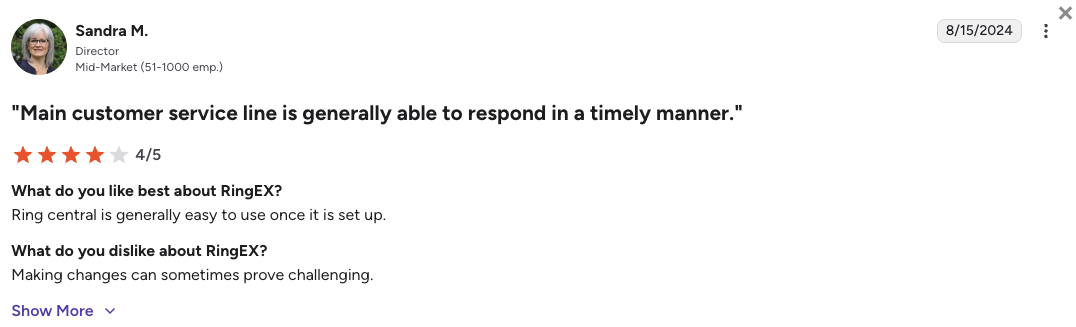
RingCentral is an enterprise-grade cloud communications giant built to handle extreme scale and complex legacy phone system replacements. The platform packs advanced global voice routing, digital internet faxing, corporate webinar hosting, and high-security compliance tools into one system. RingCentral mainly serves multinational corporations, massive hospital networks, and financial enterprises.
Why Is RingCentral a Strong Grasshopper Alternative?
- Exhaustive integration options: While Grasshopper keeps your business isolated, RingCentral connects directly to over 300 applications. This includes deep ties with large corporate software like Oracle and SAP.
- Top-tier security and compliance: RingCentral features extreme security protocols and data encryption to keep corporate conversations safely aligned with strict international financial laws.
- Total hardware versatility: The platform connects cleanly with physical desk phones, conference room equipment, and overhead building speakers that basic virtual systems cannot support.
What Are the Pros & Cons of RingCentral?
| Pros | Cons |
|---|---|
| Unrivaled feature depth: Packs every legacy telephony option from internet faxing to massive video webinars. | Frustrating text limits: The cheapest tier restricts users to a tiny pool of 25 messages per month. |
| Patented global architecture: Operates an incredibly deep, stable global voice network built for high volume. | Labyrinth of upgrade costs: Unlocking modern conversation tools requires highly expensive add-on licenses. |
| Excellent hardware support: Perfect choice for offices that want to deploy physical IP desk handsets. | Requires a dedicated IT lead: The interface is famously complicated and hard to manage without an expert. |
What Are RingCentral’s Plans & Pricing?
RingCentral pricing starts at $20/user/month (billed annually), with the following plans:
- Core - $20/user/month
- Advanced - $25/user/month
- Ultra - $35/user/month
The 25-message text restriction:
Be cautious with RingCentral's entry plan. It only allows 25 outbound texts per user each month, which forces any active business to upgrade immediately.
What Are RingCentral Customers Saying?
IT directors praise the incredible stability of RingCentral’s global network, but small business owners complain about the system's complexity.
- Flawless international scale: Multi-country offices appreciate how reliably the system links global teams together.
- Unbeatable backend security: Compliance officers trust the platform to protect sensitive corporate conversations.
- Slow, clunky customer service: Users write that resolving simple billing issues or setup bugs through support can take days.
How G2 Users Rate RingCentral?
RingCentral’s current G2 rating for its RingEX suite is 4.2/5, out of 1,350+ verified user reviews.
10. Google Voice: Best for Teams That Want to Keep It Simple
What Is Google Voice?
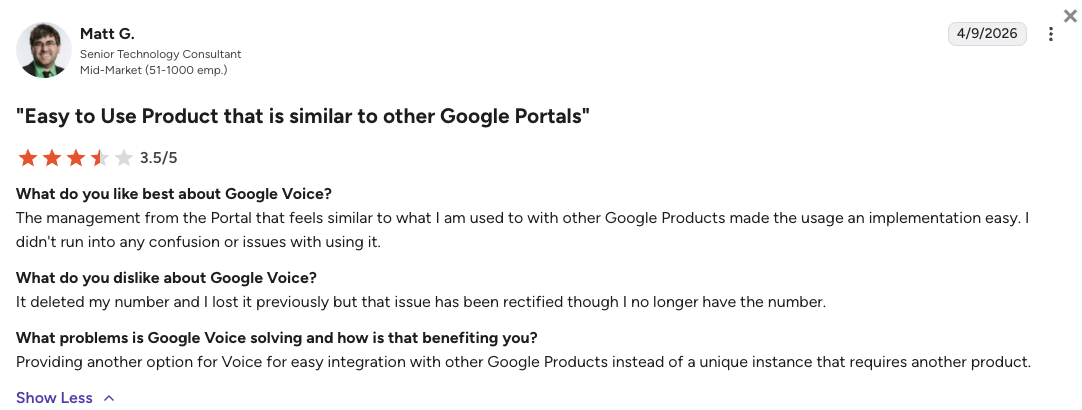
Google Voice for Business is a simplified virtual phone built exclusively to keep organizations inside the Google Workspace ecosystem. The software provides a standard, no-frills digital pad that sends calls and text links through your web browser or smartphone screen. Google Voice serves independent contractors, freelancers, and single practitioners who want a low-cost secondary line.
Why Is Google Voice a Strong Grasshopper Alternative?
- Clean Google Workspace connection: If your business lives inside Gmail and Google Calendar, this app ties into your existing workplace layout seamlessly without adding new software vendors.
- Low-cost entry path: The platform undercuts standard commercial business phone pricing heavily, offering a basic calling extension for solo operations on a tight budget.
- Familiar corporate infrastructure: Uses Google's massive global network server maps to deliver stable voice audio lines that outpace Grasshopper's laggy application performance.
What Are the Pros & Cons of Google Voice?
| Pros | Cons |
|---|---|
| Familiar Google design: Connects cleanly with your existing workspace contacts and calendar invites. | Zero software integrations: No native links with databases like Salesforce or HubSpot. |
| Highly accessible billing: Simple price point that makes it easy for solo operations to get a secondary line. | Hypersensitive spam filters: Automated robot filters can suspend your account for texting appointment links. |
| Crisp audio performance: Leverages global cloud servers to maintain good conversation clarity. | Zero human technical help: Leaves your business completely dependent on community forum pages if lines break. |
What Are Google Voice’s Plans & Pricing?
Google Voice pricing starts at $10/user/month (billed annually) on top of your mandatory active Google Workspace account, using these tiers:
- Starter - $10/user/month
- Standard - $16/user/month
- Premier - $24/user/month
The ten-user system wall:
Mind that the cheap $10/mo package places a hard wall on your business growth, permanently capping your maximum team account size at ten total accounts.
What Are Google Voice Customers Saying?
Independent operators enjoy the clean simplicity of Google Voice’s web dialer, but expanding service teams feel trapped by the complete lack of business features.
- Familiar, easy interface: Users like that the software functions exactly like their consumer Google apps.
- Clean voicemail transcripts: Solo workers appreciate reading phone message texts straight inside their Gmail inboxes.
- Sudden automated bans: Small business owners share horror stories of losing their main client phone line instantly with no human appeal option.
How G2 Users Rate Google Voice?
Google Voice’s current G2 rating is 4.1/5, out of 150+ verified user reviews.
What Users Are Really Saying About Grasshopper Alternatives and Competitors
Real users agree: Grasshopper is fine for solo founders, but growing teams need an immediate upgrade. Across Reddit, Quora, and G2, business pros report leaving Grasshopper to escape broken text messages, missing integrations, and stalled daily work. They switch to modern phone systems to automate daily logs, use auto-dialers, and get real human support.
What Redditors Are Asking and Saying about Grasshopper Alternatives
Reddit serves as a prime destination for honest, technical software reviews. On popular subreddits like r/VOIP and r/smallbusiness, real founders openly discuss their struggles with Grasshopper's aging infrastructure and hidden regulatory markups.
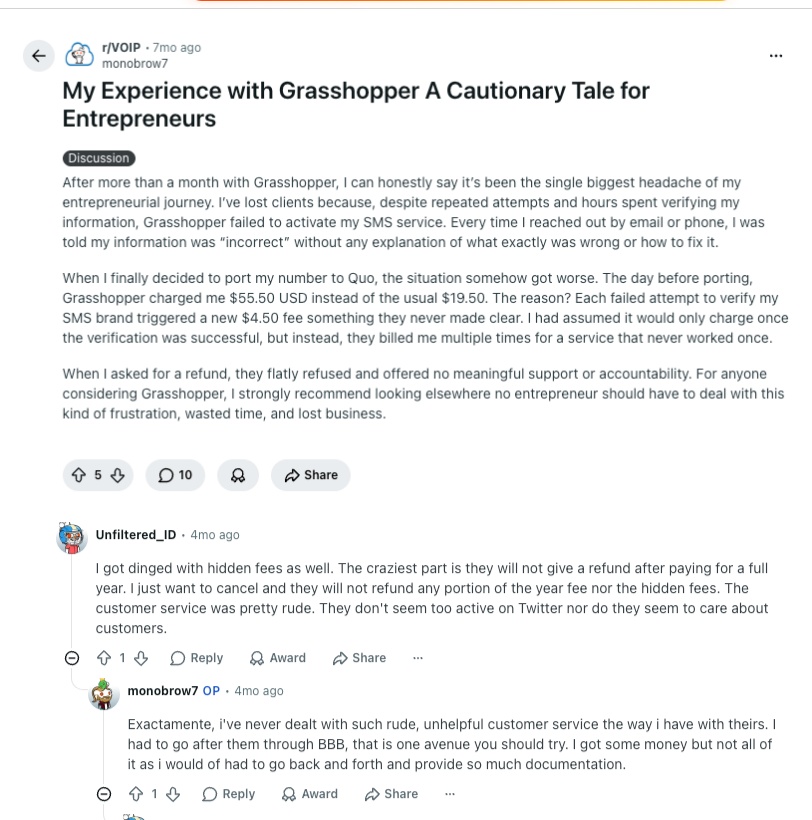
- Trapped in text compliance loops: In multiple r/VOIP threads, users warn about serious automated bugs within Grasshopper’s campaign registry setup. Founders share stories of the system failing their brand registration repeatedly, charging them a hidden $4.50 penalty every time, while customer support offers zero help. Commenters regularly advise moving numbers to newer workspaces like Quo (OpenPhone) to get working text channels.
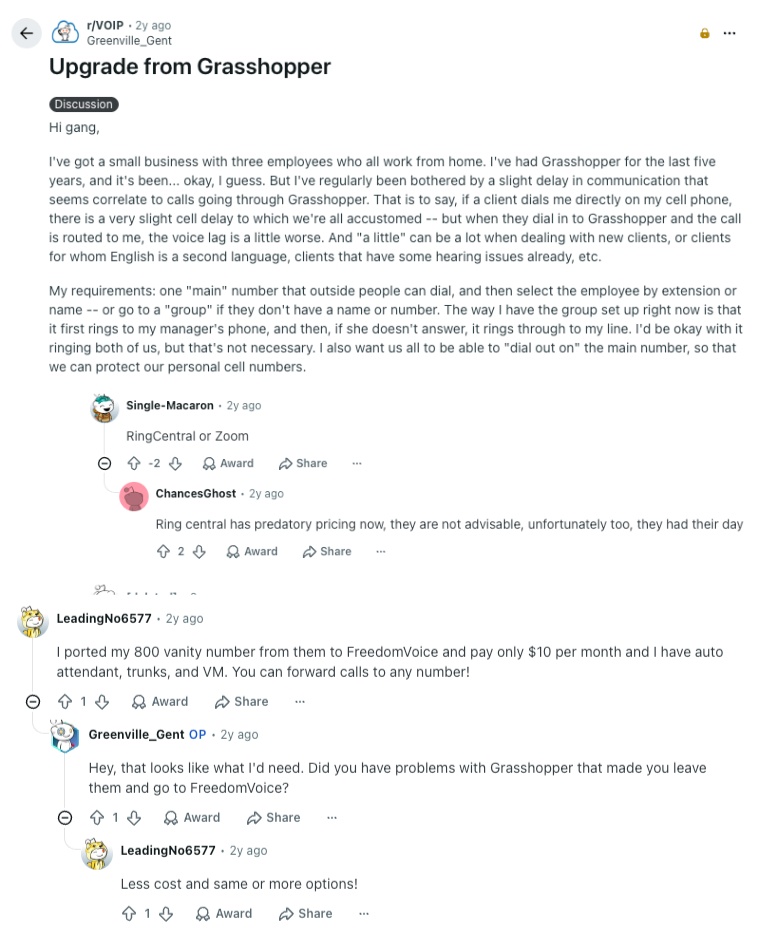
- Fighting severe conversation voice lag: In a popular upgrade thread on r/VOIP, a home-based business owner explains how a constant audio delay chokes their client calls. They note that while a normal cell phone delay is small, Grasshopper routes calls with a heavy voice lag that disrupts natural conversations. Commenters step in to suggest platforms with stronger network backbones like Zoom Phone or RingCentral.
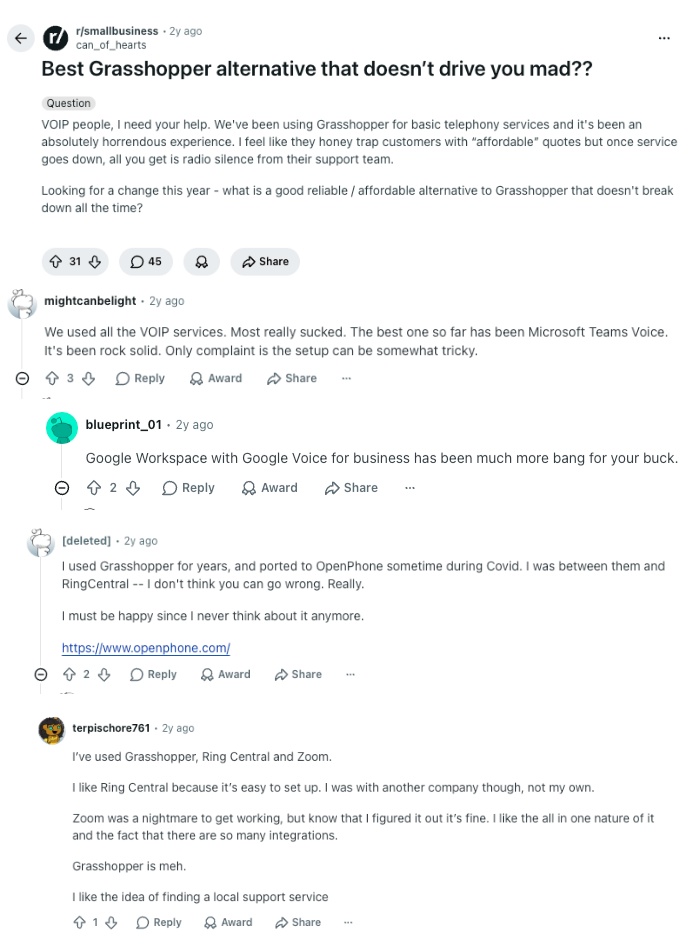
- Frustration with support during outages: On r/smallbusiness, an active thread outlines how Grasshopper lures small teams in with cheap rates but leaves them completely stranded during system outages. Multiple business owners note that when their phone lines go down, they receive nothing but radio silence from the customer service team. The community highly recommends upgrading to professional platforms that offer true multi-user support queues.
What Quora Users Are Asking about Grasshopper Alternatives
Quora discussions lean heavily toward day-to-day business productivity and team performance. When users ask how to optimize their phone systems, industry experts consistently bring up a few clear software names.
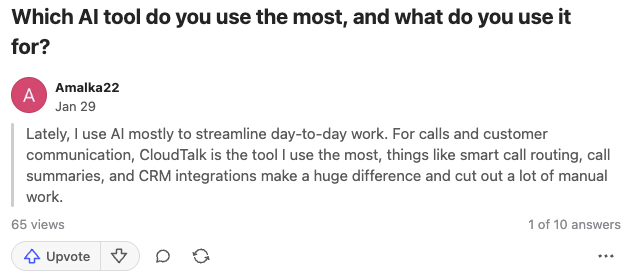
- The demand for modern AI workflows: In trending artificial intelligence threads, business consultants break down how smart platforms change daily operations. Commenters highlight that instead of just routing basic calls, systems like CloudTalk utilize voice AI solutions to automate call notes, write instant summaries, and link insights directly back to company records.
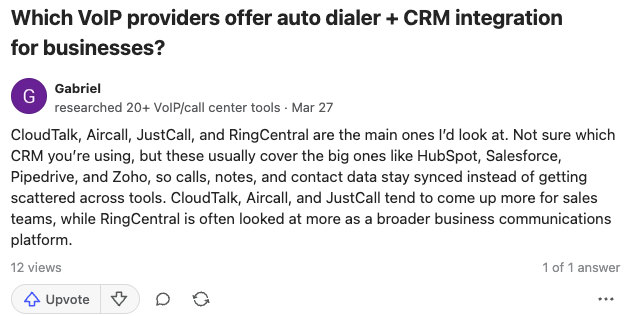
- The need for automated sales dialers: In sales performance discussions, small business leads ask how to move past manually punching numbers into a keypad. Experts jump into the answers to recommend providers like CloudTalk, JustCall, and Aircall because they bundle powerful auto-dialers with native CRM integrations to keep customer records updated effortlessly.
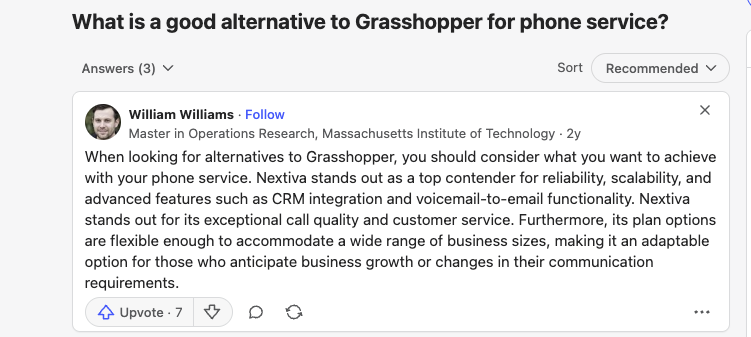
- Upgrading for long-term scalability: When users look for direct Grasshopper phone service replacements, operational advisors recommend looking at flexible communication suites. Experts note that platforms like Nextiva serve growing offices much better because their plan tiers expand cleanly alongside your team size while maintaining clear audio quality.
How Verified G2 Reviewers Compare Grasshopper to Its Alternatives
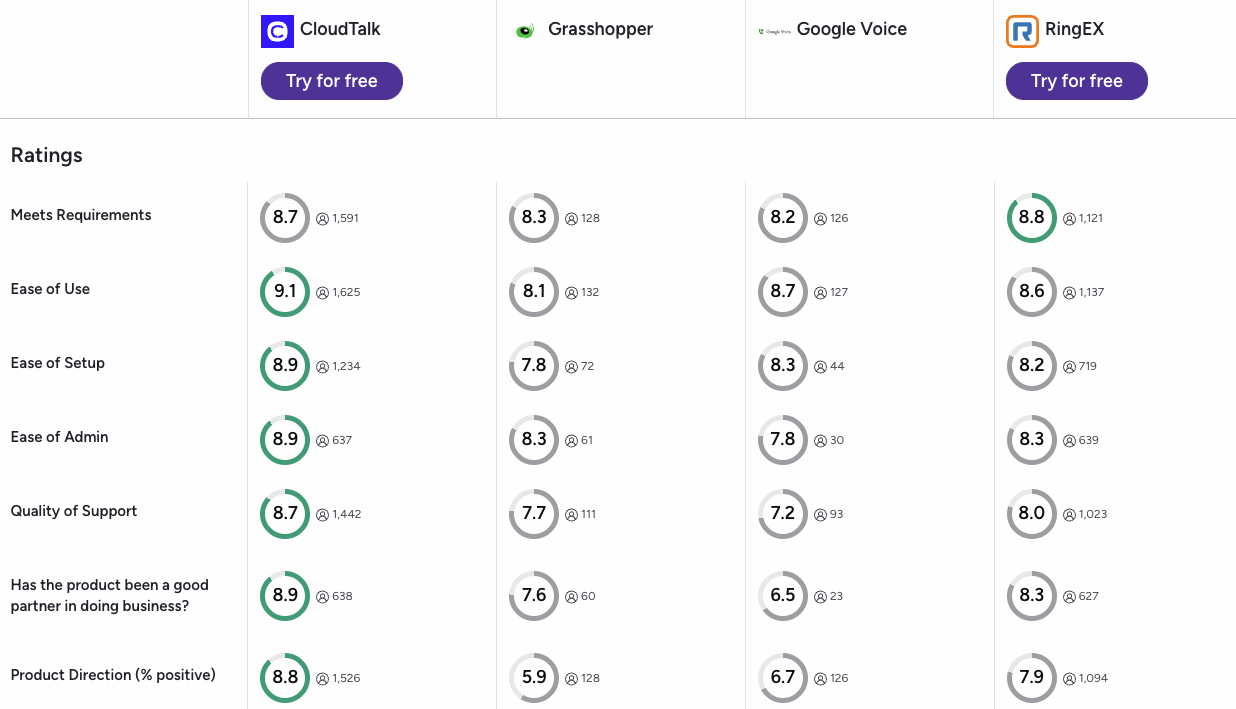
G2’s community of verified software buyers focuses on measurable performance metrics like Quality of Support and Ease of Setup. When looking at the aggregate data, users consistently rank Grasshopper’s top competitors higher in the categories that matter most for scaling daily operations.
When looking at users who actively switched, a few major themes stand out:
- The Quality of Support Gap: Support is a known pain point for Grasshopper, reflected in its low 7.7 user satisfaction rating. Meanwhile, professional teams highly favor CloudTalk (8.7) and RingCentral/RingEX (8.0) for providing highly-rated, responsive technical assistance when phone lines break down.
- Product Direction and Features: Grasshopper scores a highly critical 5.9 for its product direction, proving that users feel the software has stagnated without adding modern tools. In contrast, platforms like CloudTalk hold an 8.8 rating for product direction because they continuously roll out valuable tools like conversational AI and advanced routing blocks.
- Ease of System Administration: Managing users and changing phone extensions is notoriously clunky on Grasshopper, earning it a low 8.3 score. Platforms like CloudTalk hold a dominant 8.9 admin rating, giving growing small businesses a much simpler dashboard to control their team settings without needing dedicated IT staff.
CloudTalk vs. Grasshopper: Final Head-to-Head Comparison
Choosing between CloudTalk and Grasshopper comes down to whether you want a static forwarding line or an automated growth engine. Grasshopper functions purely as a secondary digital pad to mask your personal cell number, while CloudTalk unifies your global telephone channels, AI notes, and company software records into one platform.
Grasshopper vs CloudTalk: Head-to-Head Comparison
| Category | CloudTalk | Grasshopper | Winner |
|---|---|---|---|
| Starting Price (annual billing) | $19/user/mo | $14/month (Flat monthly rate) | Grasshopper |
| Minimum Users | 1 User | 1 User | Tie |
| Network Reliability Guarantee | Yes (99.999% uptime guarantee) | No formal guarantee | CloudTalk |
| Business App Syncing | Yes (Two-way syncing with 100+ tools) | No (Manual data entry required) | CloudTalk |
| Outbound Sales Dialers | Yes (Preview, Smart, and Power on premium tiers, plus Parallel add-on) | No (Manual dialing only) | CloudTalk |
| International Phone Numbers | Available in 160+ countries | Available in US and Canada only | CloudTalk |
| Call Routing Menus | Yes, visual drag-and-drop designer (+ keeps text messaging fully active) | Yes, basic (+ disables text messaging when turned on) | CloudTalk |
| Text Messaging Registration Fees | Included in the standard setup process | An additional $4.50 penalty per failed registration attempt | CloudTalk |
| Artificial Intelligence Tools | Yes (Automated transcripts, summaries, and voice agents) | No (No native AI capabilities) | CloudTalk |
| Customer Support | 24/7 live chat (plus phone support on premium plans) | Ticket-based email support only | CloudTalk |
| G2 Rating | 4.4/5 (1,800+ reviews) | 3.9/5 (150+ reviews) | CloudTalk |
| Free Trial | 14-day fully functional trial | 7 days | CloudTalk |
The true cost of broken text channels:
Adding a basic phone menu to handle more calls permanently disables texting on that Grasshopper line. Your customers' messages will silently vanish, costing you active leads. CloudTalk keeps your call routing and SMS channels perfectly unified, ensuring you capture every conversation and never miss a revenue opportunity.
How to Choose the Right Grasshopper Alternative for Your Business?
Choosing the right Grasshopper alternative comes down to pinpointing the bottlenecks slowing your team down. Whether you are losing hours to manual data entry, dealing with broken text lines, or struggling without auto-dialers, the best Grasshopper replacement depends entirely on your daily workflow. Once you isolate your biggest roadblock, match it to the areas below to find your perfect fit.
1. What Is the Best Grasshopper Alternative for Predictable Billing?
If your primary goal is to avoid surprise regulatory penalties and unexpected backend usage fees, you need a calling provider with completely transparent software plans.
- Top Picks: CloudTalk is the best Grashopper alternative for price predictability because it safely bundles your basic compliance parameters and offers flat monthly rates for conversation transcripts. Nextiva also represents a dependable option if you want clear text message volume allowances included from day one.
2. Which Grasshopper Alternative Has the Best CRM Sync?
If your customer service reps waste hours manually copying notes because your phone application won’t speak to the rest of your stack, you must choose a system built on true two-way syncing.
- Top Picks: CloudTalk wins this category easily by utilizing deep-sync technology to auto-log every call record, voicemail, and conversation timeline straight into HubSpot or Salesforce. Aircall is another strong option for managers who want a large application marketplace.
How CloudTalk x HubSpot saved Revolut 40+ hours/week:
When global fintech Revolut expanded its outbound sales team, their previous VoIP provider lacked the agent oversight and deep CRM syncing they needed to grow. This is exactly where systems with limited global footprints or rigid routing fall short, and why scaling teams often choose CloudTalk over disconnected competitors like Grasshopper.
3. What Is a Good Grasshopper Alternative for International Teams?
If you are trying to expand globally, Grasshopper's strict regional boundaries will lock your outreach down and hold you back.
- Top Picks: CloudTalk is the absolute leader for global deployment, providing high-quality virtual numbers in over 160 countries backed by an enterprise network that keeps call distortion down.
4. Which Grasshopper Competitor Is Ideal for Text-Heavy Sales?
If your daily client prospecting campaigns depend on running bulk outbound text sequences without triggering carrier delivery locks, you need an architecture built around high-volume messaging.
- Top Picks: JustCall serves this workflow well, packing large text segment pools and automated messaging templates directly into its standard packages.
5. What Is the Best Grasshopper Alternative for Team Collaboration?
If multiple employees need to manage the same office line together without creating duplicate client text responses, you need a shared team workspace.
- Top Picks: Quo (OpenPhone) provides an excellent shared layout that transforms telephone calls and voice messages into collaborative message threads.
6. Overall, What Is the Best Grasshopper Alternative for Growing Teams?
If you run a fast-scaling team that needs an upgrade to Grasshopper’s dropped calls, missing software links, and additional costs further down the road, you need a real business phone system.
- Top Pick: CloudTalk is the ultimate Grasshopper alternative for growing businesses. It gives your technology managers the perfect blend of high-uptime reliability, transparent per-user billing, and advanced sales dialing tools without enterprise corporate bloat.
Ready to Make the Switch from Grasshopper?
Upgrading your phone system shouldn't mean fighting your software every day. Growing teams leave Grasshopper because they can no longer afford to lose revenue to broken text lines, manual data entry, and hidden fees.
Switching from Grasshopper to CloudTalk gives you a reliable platform built to actually scale:
- Grow in 160+ countries: Build local trust worldwide with crystal-clear audio and a guaranteed 99.999% uptime.
- Automate data entry: Stop manually logging notes. Every conversation, text, and voicemail syncs straight into HubSpot or Salesforce.
- Skip the tech headaches: Avoid slow email tickets with fast, professional onboarding and 24/7 access to live human support.
- Unlock smart call insights: Move beyond basic call forwarding with AI tools that instantly generate transcripts, summaries, and performance metrics.
- Offload the routine: Deploy autonomous AI voice agents and virtual receptionists to handle the routine so your human reps can focus on calls that drive revenue.
Your company outgrew Grasshopper months ago.
Frequently Asked Questions
about Grasshopper Alternatives
Find quick answers to the most common questions businesses have about Grasshopper and its competitors.
Grasshopper is a basic virtual phone app designed for solopreneurs and independent contractors who simply want a secondary business number to mask their personal cell phones. While Grasshopper provides straightforward call forwarding, it lacks the auto-dialers, native CRM integrations, and advanced routing tools that scaling teams require.
Grasshopper’s pricing starts at a flat rate of $14/user/month. However, businesses frequently discover additional costs through unexpected $4.50 text compliance penalties and the massive amount of payroll hours their reps waste doing manual data entry due to the software's lack of database automation.
CloudTalk is better than Grasshopper, especially for scaling teams because it features advanced outbound sales dialers, 24/7 voice AI, and two-way CRM integrations. While Grasshopper is a rigid forwarding utility, CloudTalk automates your calling workflows to give you complete visibility over your team production.
Yes, CallHippo is better than Grasshopper because it provides more advanced contact center features. On the other hand, Callhippo lacks the enterprise-grade network stability of market leaders. Growing offices needing deep data sync and conversational analytics generally select CloudTalk to get global reliability and crystal-clear audio.
RingCentral is better than Grasshopper for large multinational operations needing physical hardware deployment and broad IT controls. However, smaller growing teams often find its configuration bloated and expensive, choosing CloudTalk instead for its intuitive layouts and transparent pricing.
OpenPhone (now Quo) is better than Grasshopper for early-stage micro-teams who want to manage client communications through a collaborative shared texting workspace. If your workflow requires high-speed outbound phone prospecting, CloudTalk is the superior option due to its algorithmic dialers.
Grasshopper isn’t that good for growing small businesses. The platform is a much better fit for single founders or solopreneurs who require a basic secondary number to mask their personal cell phone. The moment your small business hires staff, sets up a phone menu, or deploys a CRM, you will need a more complex Grasshopper alternative.
No, Grasshopper is fundamentally not HIPAA compliant. The platform lacks the end-to-end encryption protocols required by healthcare regulations, and they openly refuse to execute Business Associate Agreements to protect electronic patient records.
Google Voice operates on a per-user license model tied entirely to Google Workspace, while Grasshopper uses flat monthly lines that permit multiple extensions. Both utilities are basic cloud phone options that lack automated sales dialers and advanced business integrations.
No, Grasshopper does not feature native call recording, nor does it integrate with CRM tools like HubSpot or Salesforce at all. To store recordings automatically inside your customer timelines without constant manual typing, you must upgrade to a modern Grasshopper VoIP alternative like CloudTalk.
Ready to Try the Best Small Business Alternative to Grasshopper?
Join 4,000+ businesses growing with CloudTalk. No setup fees. No contracts. 14-day free trial.
Start Free Trial