Best Multi-Line Phone Systems for Small Businesses in 2026
TL;DR:
The best multi-line phone systems for small businesses handle multiple calls simultaneously without dropping the ball — covering everything from call routing and IVR to CRM integrations, with fast setup and no enterprise-level overhead. The right choice improves team efficiency, reduces missed calls, and keeps customers happy even during peak hours.
Here's a list of the best multi-line phone systems for small businesses:
- 01CloudTalk — best for growing SMBs needing versatile AI-powered call management
- 02Aircall — best for small businesses focusing on daily sales and support
- 03JustCall — best for SMBs requiring advanced features and reliable systems
- 048×8 — best for businesses with a global customer base
- 05Dialpad — best for teams leveraging AI for productivity and insights
- 06RingCentral — best for businesses unifying all communication tools
- 07Nextiva — best for businesses needing robust multi-channel solutions
- 08Vonage — best for companies with tailored communication needs
- 09Ooma — best for small teams with straightforward needs
- 10Talkdesk — best for customer-centric businesses needing scalability
90% of customers consider it essential or very important to receive an immediate response to their customer service questions.1 Can your phone system deliver on that request?
If your business handles a high volume of calls or gets backed up during peak hours, using a multi-line phone system will save you from unanswered calls and losing opportunities.
To help you choose the best multi-line phone system provider for your company, we've put together a list of the 10 best options for small businesses in 2026. Let's jump right into it!
Never miss a call again with CloudTalk.

What is a Multi-line Phone System?
A multi-line business phone system is a solution designed to enable your company to handle multiple calls simultaneously, ensuring no call goes unanswered, even during peak hours.
It's a great fit for growing businesses that want to stay connected with customers and team members without missing a beat. With this setup, you won't have to worry about calls getting dropped or opportunities slipping through the cracks.
Beyond simply managing concurrent calls, multi-line systems come equipped with advanced features such as call transfer, interactive voice response (IVR), call routing, and more.
These tools can automate routine tasks and free up your team to focus on customer interactions.
The 10 Best Multi-line Phone Systems for Small Businesses
Multi-line VoIP phone systems offer small businesses an affordable and efficient way to manage calls and improve customer service.
To make your search easier, we've compiled a list of the top 10 providers of multiple phone lines for small businesses.
Best Multi-Line Phone Systems for Small Businesses:
| Provider | Starting Price | Key Features | Best For |
|---|---|---|---|
| 1. CloudTalk | $19 per user/month | Auto Dialers, Call Monitoring, IVR, Call Notes, Call Flow Designer, Campaigns | Growing SMBs needing versatile call management |
| Aircall | $30 per user/month | Automatic Call Distribution, Call Monitoring, Call Recording, Call Routing | Small businesses focusing on daily sales and support |
| JustCall | $29 per user/month | Automatic Call Distribution, Call Recording, Call Masking, Conference Calls | SMBs requiring advanced features and reliable systems |
| 8x8 | Not disclosed | IVR, Skills-Based Routing, Call Center Analytics, Call Monitoring | Businesses with a global customer base |
| Dialpad | $15 per user/month | AI Transcription, Google Workspace Integration, Video Conferencing Tools | Teams leveraging AI for productivity and insights |
| RingCentral | $20 per user/month | Video Conferencing, Omnichannel Communication, Customizable Analytics | Businesses unifying communication tools |
| Nextiva | $15 per user/month | Advanced Call Queues, CRM Tools, IVR Features | Businesses needing robust multi-channel solutions |
| Vonage | $0.00798/min (voice) | Custom API Integrations, Ring Groups, Single Sign-On | Companies with tailored communication needs |
| Ooma | $19.95 per user/month | 3-Way Calling, Virtual Receptionist, Voicemail-to-Email | Small teams with straightforward needs |
| Talkdesk | $85 per user/month | Call Routing, IVR, Workforce Management, AI Automation | Customer-centric businesses needing scalability |
#1: CloudTalk — Best for Growing SMBs Needing Versatile AI-Powered Call Management
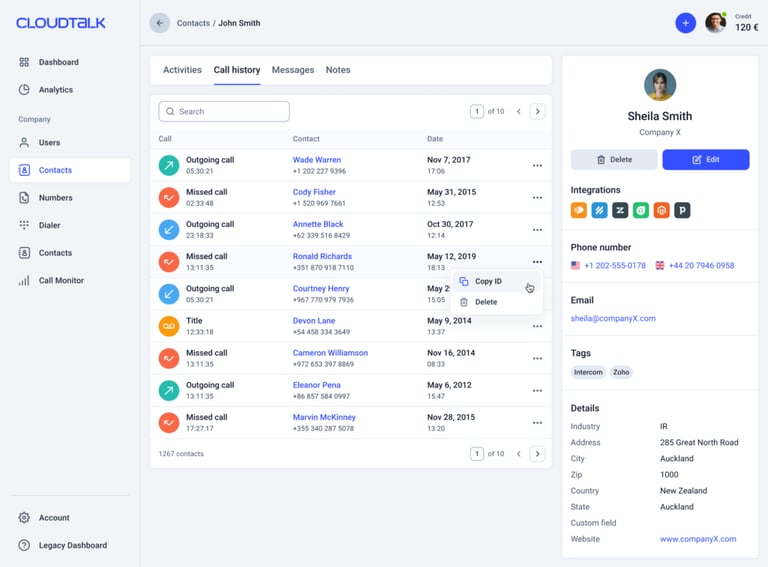
What Is CloudTalk?
CloudTalk leads the way in AI-powered business calling software, purpose-built to enhance the performance of sales and customer support teams. Trusted by more than 5,500 innovative SMBs, CloudTalk ensures crystal-clear call quality in 160+ countries, enabling teams to have meaningful, results-driven conversations.
Who Is CloudTalk Best For?
Compatible with businesses of all sizes, with a focus on growing SMBs
What Is CloudTalk's Pricing?
- Lite plan: $19 per user/month billed annually, LATAM only
- Starter plan: $25 per user/month billed annually
- Essential plan: $29 per user/month billed annually
- Expert plan: $49 per user/month billed annually
- Custom plan: Contact our team for a tailor-made offer
What Are CloudTalk's Key Features?
- Smart Dialer and Power Dialer
- Call Monitoring
- International Numbers
- IVR and Automated Call Distribution
- Call Notes
- Call Flow Designer
- Campaigns
- AI Voice Agents
What Key Integrations Does CloudTalk Offer?
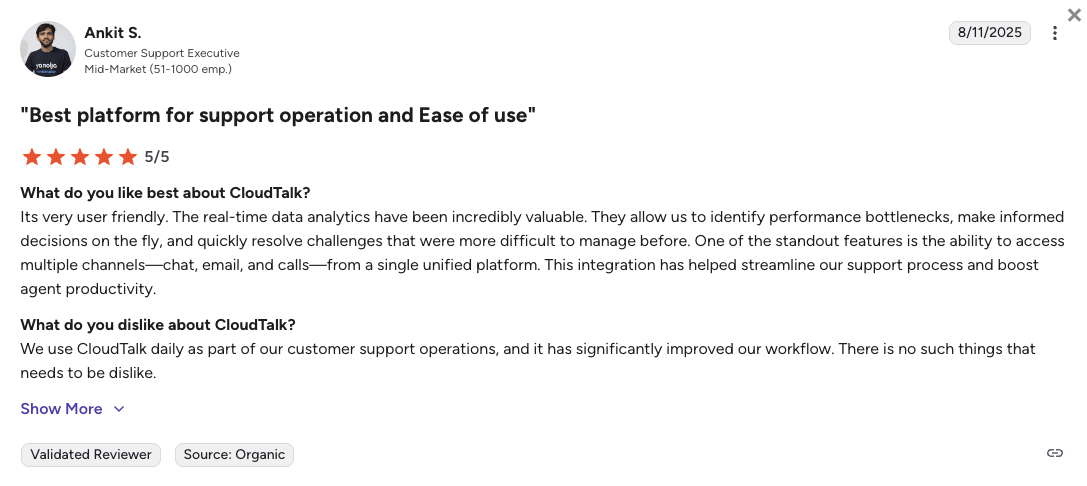
How Do Users Rate CloudTalk?
What Are CloudTalk's Pros & Cons?
| Pros | Cons |
|---|---|
| Easy to use and set up, with an intuitive interface | No support for on-premises landline (PBX) hardware — it's fully cloud-based |
| Provides reliable support for cloud-based phone system | Built around voice, so it's not a full omnichannel suite (email, live chat, video conferencing live in dedicated tools) |
| Robust package of calling features and AI-powered tools |
#2: Aircall — Best for Small Businesses Focused on Daily Sales and Support
What Is Aircall?
Aircall is a powerful calling solution trusted by over 15,000 clients worldwide. It's built to accelerate sales processes, enhance communication with prospects, and drive deal closures. With call-handling features, CRM integrations, and Analytics, Aircall streamlines workflows and empowers teams to connect more effectively.
Who Is Aircall Best For?
Primarily targeted at small businesses using the phone to conduct sales and support business daily.
What Is Aircall's Pricing?
- Essential plan: $30 per user/month, billed annually
- Professional plan: $50 per user/month, billed annually
- Custom plan: Price-upon-request
What Are Aircall's Key Features?
- Automatic Call Distribution
- Call Monitoring
- Call Transfer
- Call Recording
- Call Routing
What Are Aircall's Key Integrations?
- ActiveCampaign
- Freshdesk
- Odoo CRM
- Alloy Automation
- Avoma
How Do Users Rate Aircall?
Aircall Pros & Cons
| Aspect | Pros | Cons |
|---|---|---|
| Pricing & Plans | Plans offer comprehensive features across tiers | The starting price is higher than competitors, and advanced features through add-ons. |
| Features Set | Provides a great set of call-handling features | Lacks essential video calling and webinar hosting features |
| Technical Infrastructure | Easy to set up and straightforward interface | Users have reported inconsistent call quality, with echoes and disconnections |
Recommended Reads
#3: JustCall — Best for SMBs Requiring Advanced Features and Reliable Systems
What Is JustCall?
JustCall is a modern call center solution designed to help teams scale efficiently while minimizing complexities, as claimed by the provider. While feature-rich, lower-tier plans have usage caps, it is essential to evaluate your business needs carefully.
Who Is JustCall Best For?
Well-suited for small and medium-sized businesses that need a reliable phone system with advanced features.
What Is JustCall's Pricing?
- Team: $29 per user/month billed annually
- Pro: $49 per user/month billed annually
- Pro Plus: $89 per user/month billed annually
- Business: Price-upon-request
What Are JustCall's Key Features?
- Automatic Call Distribution
- Call Recording
- Call Masking
- Conference Calls
What Are JustCall's Key Integrations?
How Do Users Rate JustCall?
JustCall's Pros & Cons
| Aspect | Pros | Cons |
|---|---|---|
| Pricing & Plans | Plans offer comprehensive features across tiers | The starting price is higher than competitors, and advanced features through add-ons. |
| Features Set | Provides a great set of call-handling features | Lacks essential video calling and webinar hosting features |
| Technical Infrastructure | Easy to set up and straightforward interface | Users have reported inconsistent call quality, with echoes and disconnections |
Recommended Reads
#4: 8×8 — Best for Businesses with a Global Customer Base
What Is 8×8?
8x8 is a well-regarded communication platform with a global reach, chosen for businesses with international operations. Its scalable design ensures it can grow alongside teams of different sizes.
Who Is 8×8 Best For?
Businesses with a global customer base.
What Is 8x8's Pricing?
- Contact Center: Not disclosed (used to be $24 per user/month)
- CX Beyond the Contact Center: Not disclosed (used to be $44 per user/month)
- Communications APIs: Not disclosed (used to be $85 per user/month)
- Unified Communications: Not disclosed (used to be $110 per user/month)
What Are 8x8's Key Features?
- Interactive Voice Response (IVR)
- Skills-Based Routing
- Call Center Analytics
- Call Monitoring, Barging, Whispering
What Are 8x8's Key Integrations?
- Salesforce
- Zendesk
- Microsoft Teams
How Do Users Rate 8x8?
8x8 Pros & Cons
| Aspect | Pros | Cons |
|---|---|---|
| Pricing & Plans | Plans are comparatively affordable and well-balanced | The subscription cost quickly balloons with hidden fees |
| User Interface | Intuitive and user-friendly design | The initial setup can be complex |
| Features Capabilities | Centralizes operations across calls, SMS, email, and social media | Geographic restrictions for SMS and the requirement of an office for calling capabilities |
#5: Dialpad — Best for Teams Leveraging AI for Productivity and Insights
What Is Dialpad?
Dialpad is a communications platform with AI features that empower customer-facing teams. While its entry-level pricing is appealing, many handy tools are locked behind premium tiers and add-ons.
Who Is Dialpad Best For?
Teams focusing on leveraging AI for productivity and customer insights.
What Is Dialpad's Pricing?
- Standard plan: $15 per user/month billed annually
- Pro plan: $25 per user/month billed annually
- Enterprise plan: Tailor-made offer
What Are Dialpad's Key Features?
- AI-powered transcription and Analytics
- Integration with Google Workspace and Microsoft Teams
- Video Conferencing Tools
What Are Dialpad's Key Integrations?
- Salesforce
- Miro
- Zendesk
How Do Users Rate Dialpad?
Dialpad's Pros & Cons
| Aspect | Pros | Cons |
|---|---|---|
| Pricing & Plans | Competitive base pricing | Numerous hidden fees and essential features require add-ons |
| Features | Excels in video conferencing and workflow integrations | Very limited in calling features and handy tools tied to higher-tier, custom-priced plans |
| Analytics & Reporting | Basic analytics and reporting for all the plans | AI analytics are available only as additional plans |
#6: RingCentral — Best for Businesses Looking to Unify All Communication Tools
What Is RingCentral?
RingCentral is a comprehensive, unified communications platform offering calls, video conferencing, and team messaging. With advanced features and integrations, it's ideal for businesses looking to unify their communication tools under one system.
Who Is RingCentral Best For?
Businesses looking for an all-in-one communication solution.
What Is RingCentral's Pricing?
- Core plan: $20 per user/month billed annually
- Advanced plan: $25 per user/month billed annually
- Ultra plan: $35 per user/month billed annually
- Customer Engagement Bundle: Upon request
What Are RingCentral's Key Features?
- Video Conferencing Tools
- Omnichannel Communication
- Customizable Analytics
What Are RingCentral's Key Integrations?
- HubSpot
- Salesforce
- Zendesk
- Slack
How Do Users Rate RingCentral?
RingCentral's Pros & Cons
| Aspect | Pros | Cons |
|---|---|---|
| Pricing & Plans | Plans are comparatively affordable and offer comprehensive features | Many of the advanced features are locked behind expensive add-ons |
| Technical Infrastructure | Robust platform with a selection of 200+ integrations | Set up can take up to 90 days and involves an implementation fee |
| Customer Support | Provides business with 24/7 unlimited chat and phone support | Based on review portals, customer support is the most criticized aspect of its service |
Recommended Reads
#7: Nextiva — Best for Businesses Needing Robust Multi-Channel Solutions
What Is Nextiva?
Nextiva is a trusted communication platform designed to keep businesses operating in-office or remotely. Renowned for its reliability and strong customer support, it serves companies seeking a robust and efficient communication system.
Who Is Nextiva Best For?
Businesses needing a robust and reliable phone system that works across multiple channels.
What Is Nextiva's Pricing?
- Core: $15 per user/month billed annually
- Engage: $25 per user/month billed annually
- Scale: $75 per user/month billed annually
What Are Nextiva's Key Features?
- Advanced call queues
- CRM and team collaboration tools
- Auto-attendant and IVR features
What Are Nextiva's Key Integrations?
How Do Users Rate Nextiva?
Nextiva's Pros & Cons
| Aspect | Pros | Cons |
|---|---|---|
| Features Set | Combines multiple channels, including social media, chatbots, and email | Many key features require upgrades. Calls and text are only available in the second-tier plan |
| User Experience | The platform is intuitive and easy to navigate | Users report mobile app problems like freezing screens, slow loading times |
| Customer Support | Provides responsive and knowledgeable 24/7 customer service | A considerable portion of users reported long waiting times and poor customer service. |
#8: Vonage — Best for Companies with Tailored Communication Needs
What Is Vonage?
Vonage provides a versatile communication solution that adapts to various business needs. It's particularly valued for its flexibility, allowing businesses to tailor their system to specific requirements.
Who Is Vonage Best For?
Companies with unique requirements needing tailored communication solutions.
What Is Vonage's Pricing?
- Usage-based: Starting at $0.00798/min (voice)
What Are Vonage's Key Features?
- Custom API integrations
- Ring Groups
- Single sign-on functionality
What Are Vonage's Key Integrations?
- HubSpot
- Salesforce
- Slack
- Microsoft Teams
How Do Users Rate Vonage?
Vonage's Pros & Cons
| Aspect | Pros | Cons |
|---|---|---|
| Voice Technology | HD codec with adaptive bitrate optimization | Increased data usage compared to competitors |
| Pricing & Plans | Competitive base pricing for different sizes of businesses | Numerous hidden fees and essential features require add-ons |
| Reliability | 99% uptime guarantee | High resource overhead impacting system performance |
#9: Ooma — Best for Small Teams with Straightforward Needs
What Is Ooma?
Ooma offers an affordable and accessible communication system tailored to small businesses. It has a straightforward setup and practical tools for teams looking for an easy-to-manage solution.
Who Is Ooma Best For?
Small teams with no major ambitions to scale.
What Is Ooma's Pricing?
- Office: $19.95 per user/month billed annually
- Office Pro: $24.95 per user/month billed annually
- Office Pro Plus: $29.95 per user/month billed annually
What Are Ooma's Key Features?
- 3-Way Calling
- Virtual Receptionist
- Voicemail-to-Email Forwarding
What Are Ooma's Key Integrations?
How Do Users Rate Ooma?
Ooma's Pros & Cons
| Aspect | Pros | Cons |
|---|---|---|
| Features Set | 100+ communications features for small business | Requires Ooma hardware for some features |
| Pricing & Plans | Competitive base pricing for different sizes of businesses | Limitations on “unlimited” calling and hidden fees |
| Voice System | Easy setup process that doesn’t require advanced technical skills | Users have reported issues with call clarity and reliability. |
Recommended Reads
#10: Talkdesk — Best for Customer-Centric Businesses Needing Scalability
What Is Talkdesk?
Talkdesk has been on the VoIP scene since 2011. Their smart-calling platform has improved the communication capabilities of over 1,800 sales and customer support teams through high-tech automation and reliable call quality.
Who Is Talkdesk Best For?
Customer-centric businesses of all sizes that need a flexible and scalable contact center solution.
What Is Talkdesk's Pricing?
- Digital Essentials: $85 per user/month
- Cloud Essentials: $105 per user/month
- Elite: $165 per user/month
- Industry Experience Cloud: $145 per user/month
What Are Talkdesk's Key Features?
- Call Routing
- IVR
- Workforce management
- Real-time monitoring
- Voice and screen recording
What Are Talkdesk's Key Integrations?
- Salesforce
- Zendesk
- Slack
- MS Teams
- ServiceNow
- MS Dynamics
- Zoom
How Do Users Rate Talkdesk?
Talkdesk's Pros & Cons
| Aspect | Pros | Cons |
|---|---|---|
| Integration Capabilities | Offers a wide range of integrations with popular CRM systems | Some integrations require custom development, which may add time and complexity |
| Scalability | Flexible cloud-based infrastructure supports scaling as your business grows. | Performance can degrade slightly during peak usage if scaling isn’t managed effectively. |
| AI and Automation | Provides robust AI-powered tools like virtual agents and automated workflows | It can be challenging to configure without technical expertise |
Recommended Reads
How We Ranked These 10 Best Multi-Line Phone Systems
With so many options out there, choosing the right phone system for your business can feel overwhelming. To make things easier, we've compiled this list based on the factors that matter most to businesses:
- Reliability: We looked at each provider's dependability in terms of uptime and call quality. Those with a consistent and reliable performance ranked higher.
- Pricing: Cost-effectiveness was a key consideration. We analyzed the pricing of various plans, checked for hidden fees, and evaluated whether the features offered justified the price.
- Features: The capabilities of each system were a major focus. We looked at call-handling tools, advanced analytics, AI-powered functionalities, and automation. Providers with more comprehensive and practical features earned better rankings.
- Integrations: Compatibility with existing tools like Salesforce, HubSpot, and Zendesk was essential. Providers that offered seamless integrations with popular software stood out.
- Reviews and Customer Support: User feedback on platforms like G2, Trustpilot, and Capterra helped us gauge satisfaction levels. We also considered the responsiveness and helpfulness of customer support teams, prioritizing those with excellent service records.
Let your consumer find you everywhere.
How to Choose the Multi-Line Phone System for Your Business
Your choice of VoIP multi-line phone system will have a major impact on your business operations, so it's important to make a well-informed decision. Keep these essential factors in mind to find the system that best suits your needs:
- Budget: Look for a solution that aligns with your financial plan while delivering the features your business needs. Scalable pricing options are a plus, as they allow the system to grow with your company, providing long-term value.
- Essential Features: Identify the features that will benefit your operations the most. Tools like Automatic Call Distribution, Call Queuing, and Voicemail can improve how your company handles multiple calls simultaneously.
- Scalability: Choose a system that can expand alongside your business, whether that means accommodating more employees, handling higher call volumes, or serving new locations.
- Integration: A VoIP system that integrates smoothly with your existing tools—such as CRM platforms or help desk software—can increase productivity by making it easy to access and use customer data.
- Ease of Use: An intuitive system is beneficial for both your team and your customers. Complicated interfaces or difficult setups can lead to inefficiencies and frustrations, so prioritize user-friendly solutions.
- Reliability and Customer Support: Check user reviews to ensure the system is dependable and the provider offers quality support. Downtimes and technical issues can harm your business reputation.
Managing Thousands of Calls Without Missing a Beat
A call center receives an average of 4,400 calls in a month. That's a lot of conversations to manage! For small businesses, it's a reminder of how important it is to have a reliable multi-line phone system in place to keep things running smoothly and avoid missed opportunities.
A multi-line system ensures your team can handle multiple calls, cutting down on hold times and keeping customers happy. With features like call routing, IVR, and monitoring, these systems don't just make life easier; they help your business deliver a better overall experience.
Choosing the right system is an investment in your business's future. CloudTalk stands out as the top choice for growing SMBs. With its advanced features, CRM integrations, and crystal-clear call quality in over 160 countries, CloudTalk handles multiple calls from all over the world.
Still not convinced that CloudTalk is the best fit for you? Then, book a demo.
Sources:
Frequently asked questions
A multi-line phone system lets your business handle multiple calls at the same time through a single setup — so no call goes unanswered, even during peak hours. Unlike a basic single-line phone, it supports concurrent inbound and outbound calls, call transfers, hold queues, and IVR routing. Modern cloud-based versions work over VoIP, meaning there's no hardware required and your team can use it from anywhere.
Each line operates as a separate channel within the same system. When a call comes in, it's routed to the right agent or queue based on rules you set — by department, availability, language, or skill using skill-based routing. Agents can place callers on hold, transfer between lines, or handle multiple calls in sequence using call queuing. Cloud-based systems manage all of this through software, with no physical switchboard needed.
The most important features are call routing, IVR, call recording, real-time call monitoring, voicemail, and CRM integrations. For growing teams, auto dialers, call queuing, and analytics are also worth prioritizing. If your team works remotely or across multiple locations, look for a cloud-based system with mobile app support and international number availability.
Cloud-based multi-line phone systems for small businesses typically start between $15 and $30 per user/month on annual billing. Entry-level plans cover basic calling and routing, while mid-tier plans ($29–$50/user/month) include CRM integrations, call recording, and analytics. Enterprise-focused platforms like Talkdesk start at $85/user/month. Most providers offer custom pricing for larger teams.
It depends on your call volume and team size. A 2-line system works for very small teams where the phone isn't the primary channel. Most growing businesses with dedicated support or sales teams need between 3 and 10 lines. A good rule of thumb: plan for enough lines so no more than 5–10% of calls ever hit a busy signal or queue timeout. Platforms like CloudTalk let you scale lines instantly as your team grows, without hardware changes.
With a cloud-based VoIP system, setup takes minutes rather than days. You sign up, add your users, configure call routing rules and IVR menus, and port your existing number if needed. Most providers — including CloudTalk — offer guided onboarding and no hardware requirements. The main decisions upfront are how many lines you need, which integrations to connect (CRM, helpdesk), and how you want calls routed during and outside business hours.