Top-Rated Virtual Office Phone Numbers for Teams & Startups
In 2025, over 82% of customers expect instant issue resolution, and 78% demand personalized service. If your business phone system can't deliver that, you're already falling behind.
Your communication setup has to keep up if you don't want to risk losing business before the conversation even begins. That’s why choosing the right virtual phone solution matters.
In addition to communication basics, you want to have smart call routing, AI-enhanced service, mobile flexibility, and a platform that grows with your team.
In this guide, we’ll break down the 10 best virtual office phone number apps in 2025 to help you find the perfect fit for your business needs.
TL;DR: The 10 Best Virtual Office Phone Number Apps in 2026
We reviewed and tested the top virtual phone number providers to help businesses pick the right solution for their team size, use case, and budget. Here are our top 10 picks:
- 01CloudTalk: Best for Sales and support teams needing global reach and AI calling
- 02CallHippo: Best for startups and SMBs wanting a budget-friendly, global-ready system
- 03RingCentral: Best for midsize and enterprise teams with high call volumes
- 04Google Voice: Best for solopreneurs and small teams already using Google Workspace
- 05Nextiva: Best for Growing SMBs needing voice + productivity in one platform
- 06Grasshopper: Best for entrepreneurs and solo founders needing a simple business line
- 07eVoice: Best for freelancers and consultants needing basic call management
- 08VoIPLine: Best for businesses needing custom VoIP setups and advanced routing
- 09FreedomPop: Best for individuals and micro-businesses needing an ultra-budget option
- 10Aircall: Customer-facing teams using CRMs and helpdesk tools
Why Trust CloudTalk?
To build this guide, we evaluated 200+ business software platforms and analyzed 5,500+ verified customer reviews across G2, Capterra, Gartner, and TrustRadius, alongside real discussions from Reddit and Quora. Every virtual office phone number provider in this list was assessed against the same criteria: call quality, global coverage, AI features, integrations, and pricing transparency.
In the last year alone, our team has published over 1,000 articles — each written by humans, for humans. No AI shortcuts, no vendor bias. Just honest, data-backed insight you can use to make a confident decision.
Learn more about our content integrity and our software review methodology.
Upgrade your business communication with unlimited virtual phone numbers.

The 10 Best Virtual Office Phone Number Apps in 2026
Virtual phone numbers aren’t tied to a specific device like a landline or mobile phone. Instead, they operate through the cloud and forward calls to an existing number you already use. This setup is often referred to as cloud telephony.
Unlike landlines that require you to stay in one place or smartphones that depend on being physically present, virtual numbers offer more flexibility. You can take calls from anywhere, on any device and without being tied to a fixed location.
So, how to get a virtual business phone number?
Let’s take a look at 10 of the top virtual phone number providers available. We’ll review what they offer, how they compare, and which might fit your business best.
| App | Starting Price | Additional Numbers Price | Notes |
|---|---|---|---|
| CloudTalk | $[cvg starter_plan]/user/mo (Starter) | From $6/number/mo | Confirmed via CloudTalk Pricing & Geographic Numbers Pricing |
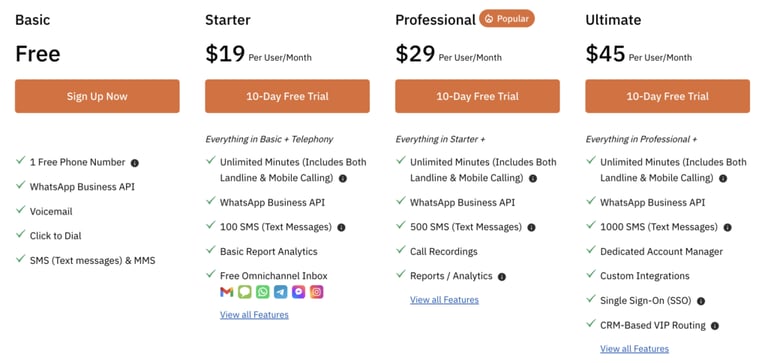
| CallHippo | $0 (Basic) | Varies (region-based) | Basic plan confirmed; additional number cost shown only after login/setup |
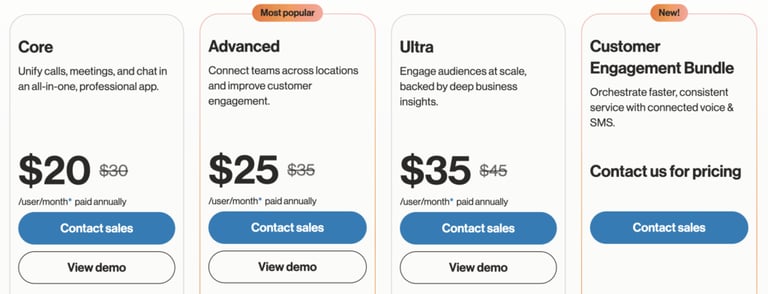
| RingCentral | $30/user/mo (Core) | $4.99–$14.99/number/mo | Base pricing public; add-on pricing varies by number type (source: RingCentral support) |
| Google Voice | $10/user/mo (Starter) | Limited – often bundled | Typically 1 number per user; extra numbers require admin management via Google Workspace |
| Nextiva | $21/user/mo (Core) | ~$5–$10/number/mo | Additional numbers cost appears in the post-signup dashboard |
| Grasshopper | $14–$26/mo | ~$10/number/mo | Basic plan starts at $14 (1 number, 3 extensions); extra numbers priced on signup |
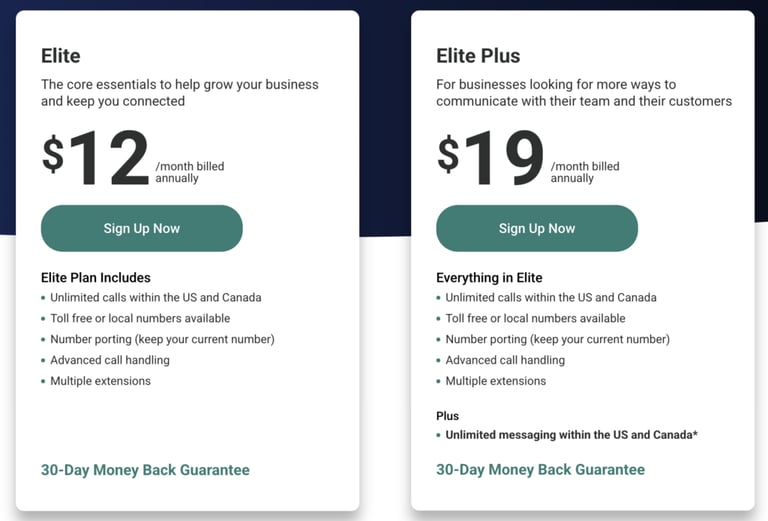
| eVoice | $14/mo (Base) | $7.95–$12.95/number/mo | Confirmed in their plan breakdown |
| VoIPLine | Custom pricing | Custom per quote | Pricing is only visible after a quote request; consistent with industry custom setups |
| FreedomPop | $2.99–$10+/mo | Unlisted | Basic plan is $2.99, VoIP with texting starts at ~$10; extra number pricing unclear |
| Aircall | From $6/number/mo | Often included/quoted | Plan pricing starts with number bundles; extra pricing is clarified during onboarding |
CloudTalk
CloudTalk is a leading cloud-based business phone system used by 5,500+ companies worldwide. It provides local, toll-free, and international numbers in over 160 countries and is loaded with powerful tools for sales, support, and remote teams.
Best For: Sales and support teams, remote businesses, call centers, and growing companies that need global reach and automation.
What are CloudTalk's Key Features?
- Smart & Power Dialer – Automate outbound calls to reach more leads faster.
- Call Flow Designer – Customize call routing to guide callers to the right team.
- Call Recording, Queuing, and Monitoring – Track, manage, and improve every call.
- AI Tools – Use sentiment analysis, transcriptions, and talk/listen ratios to optimize conversations.
- IVR & Voicemail to Email – Automate call handling and never miss a message.
- Mobile App (iOS/Android) – Take business calls on the go from any device.
- [integrations_tools]+ CRM & Helpdesk Integrations – Connect with tools like Salesforce, HubSpot, and Zendesk.
What are CloudTalk's Pros and Cons?
| Pros | Cons |
|---|---|
| Global coverage with 160+ international numbers | Premium tools require higher-tier plans |
| Advanced AI call features and analytics | Learning curve for advanced workflows |
| Seamless CRM and helpdesk integrations | Pricing may scale quickly for large teams |
CloudTalk's Plans and Pricing
- Starter: $ /user/month (unlimited inbound, call recording, desktop + mobile access)
- Essential: $/user/month (adds analytics, IVR, SMS, concurrent calls)
- Expert: $/user/month (adds AI dialers, live monitoring, Salesforce integration)
- AI Add-On: $9/user/month (sentiment, transcription, summaries)
Please note that geographical locations affect the Virtual number pricing. It starts at $6/number/month, but there’s a complete pricing and coverage list available.
Start calling with a complimentary virtual phone number for 14 days free!
CallHippo
CallHippo is a virtual phone number app designed for startups and small businesses looking for a cost-effective, quick-to-launch communication system.
It offers local and toll-free numbers in 50+ countries and supports both inbound and outbound calling, with CRM integrations and team collaboration tools.
Best For: Startups, freelancers, and SMBs needing a budget-friendly, global-ready phone solution with basic automation and CRM sync.
What Are CallHippo Key Features?
- Virtual Numbers in 50+ Countries – Establish local presence and make global calls.
- Call Recording & Analytics – Track call performance and monitor quality.
- SMS & Voicemail – Reach customers via text or follow up with custom voicemails.
- Smart Call Routing – Automatically route calls to available agents.
- Power Dialer – Call multiple numbers back-to-back without manual input.
- App Support for iOS/Android – Stay connected on the go.
- Integrations – Works with CRMs like Zoho, Pipedrive, Salesforce, and more.
What are CallHippo Pros and Cons?
| Pros | Cons |
|---|---|
| Quick setup with an intuitive interface | Interface may feel basic compared to premium tools |
| Affordable pricing, including a $0 entry plan | Reporting and analytics can be limited in lower-tier plans |
| Good for international reach and team scalabilitys | Support availability may vary by plan |
Recommended Reads
Wondering what an international phone number code is?
RingCentral
RingCentral is an established cloud communication platform tailored to large teams and omnichannel customer engagement. It combines voice, messaging, and video into one solution and offers a range of tools for managing calls at scale.
Best For: Midsize to enterprise businesses managing high call volumes and multi-channel service
What are RingCentral Key Features?
- IVR & Call Scripting – Route calls efficiently and standardize messaging.
- Predictive Dialer – Increase outbound efficiency through automation.
- Omnichannel Routing – Manage voice, SMS, chat, and social channels.
- Real-time Analytics – Track agent performance and customer trends.
- Call Recording – Log calls for compliance and training.
- Team Messaging & Video – Collaborate from one unified app.
What Are RingCentral Pros and Cons?
| Pros | Cons |
|---|---|
| Strong omnichannel support | Can be over-featured for small teams |
| Reliable performance for high call volumes | Interface may feel dated compared to newer tools |
| Well-suited for enterprise teams | Add-ons can drive up cost quickly |
Recommended Reads
Not sure how to scale your contact center with Virtual agents?
Google Voice
Google Voice is a lightweight, cloud-based phone system built for Google Workspace users. It offers straightforward features like voicemail transcription, call forwarding, and mobile support, making it a solid pick for lean startups or solopreneurs.
Best For: Small teams or solo professionals already using Google Workspace
What Are Google Voice Key Features
- Voicemail Transcription – Read messages at a glance.
- Number Forwarding – Route calls to your preferred device.
- Spam Filtering – Block unwanted calls automatically.
- Google Meet & Calendar Integration – Sync scheduling and communication.
- Cross-device App Access – Use on web, Android, or iOS.
What Are Google Voice Pros And Cons
| Pros | Cons |
|---|---|
| Affordable and simple to use | Lacks advanced features (no IVR, call routing, etc.) |
| Seamless with Google Workspace | Limited support for multiple users/teams |
| Easy to get started | Not ideal for scaling operations |
Google Voice Plans and Pricing
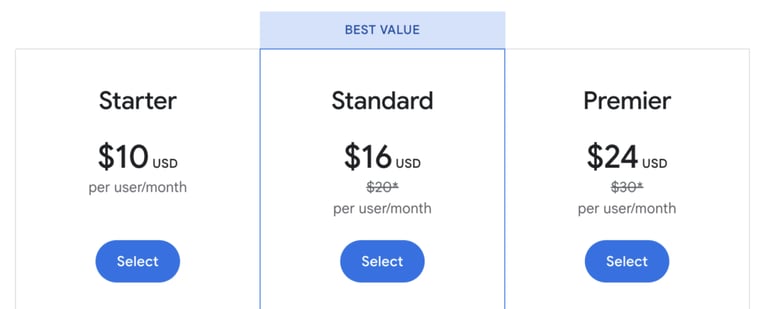
You can see their whole offering here.
Nextiva
Nextiva is a unified communications platform offering VoIP phone services along with CRM and productivity features. It’s designed for growing businesses that want voice, messaging, and analytics in one platform.
Best For: Small and mid-sized businesses that want phone + productivity in one tool
What Are Nextiva's Key Features?
- Auto-Dialer – Speed up outbound calling workflows.
- Call Logging & Analytics – Measure call metrics and optimize support.
- Voicemail to Email – Get message alerts in your inbox.
- Multi-Device Support – Use the system on mobile, tablet, or desktop.
- Team Collaboration – Chat, call, or video from one dashboard.
- CRM Integrations – Connect with tools like HubSpot and Salesforce.
What Are Nextiva's Pros and Cons?
| Pros | Cons |
|---|---|
| Feature-rich for growing teams | Some tools feel dated |
| Strong customer service reputation | Limited customization for advanced users |
| Centralized communication tools | CRM features are basic vs. standalone CRMs |
Nextiva Plans And Pricing

You can check out their whole offer here.
Grasshopper
Grasshopper is a virtual phone system designed for solo entrepreneurs and small teams. It offers professional features like business texting, call forwarding, custom greetings, and voicemail without needing additional hardware.
Best For: Entrepreneurs and small businesses that need a simple, professional business phone system
What Are Grasshopper's Key Features?
- Business Texting – Send and receive texts using your business number.
- Custom Greetings – Record or upload greetings for a polished impression.
- Call Forwarding – Route incoming calls to any number or device.
- Extensions – Set up multiple departments or team members.
- Voicemail Transcriptions – Get voicemail content delivered to your inbox.
- Wi-Fi Calling – Use your phone system on the go.
What Are Grasshopper's Pros And Cons?
| Pros | Cons |
|---|---|
| No extra hardware needed | Limited international calling support |
| User-friendly mobile and desktop apps | Fewer analytics or automation features |
| Suitable for solopreneurs and small teams | Not ideal for scaling larger operations |
Grasshopper Plans And Pricing
- Solo: $26/mo
- Partner: $44/mo
- Small Business: $80/mo
- Additional Numbers: $10/number/mo
Recommended Reads
eVoice
eVoice is a flexible virtual phone number service tailored for freelancers, consultants, and small startups. It offers basic call management tools like call queuing, auto-attendants, and voicemail transcription.
Best For: Freelancers and small startups who need essential call routing and voicemail services
What Are eVoice Key Features?
- Auto-Attendant – Direct callers through a virtual receptionist.
- Call Queuing – Hold calls in line and avoid missed connections.
- Voicemail Transcription – Read messages via email.
- Mobile App – Manage calls and texts on the go.
- Local & Toll-Free Numbers – Choose numbers from multiple regions.
What Are eVoice Pros And Cons?
| Pros | Cons |
|---|---|
| Simple and effective for basic business needs | Limited integrations with external tools |
| Voicemail to email keeps messages organized | Few advanced analytics or dialer features |
| Affordable for individuals and small teams | UI feels dated |
eVoice Plans And Pricing
VoIPLine
VoIPLine is a customizable business VoIP provider aimed at companies that need flexibility and tailored setups. With robust features like real-time analytics, advanced call routing, and CRM integrations, it’s ideal for businesses looking for full control.
Best For: Businesses that need tailored VoIP setups and custom call workflows.
What Are VoIPLine Key Features?
- Real-Time Call Monitoring – Supervise live calls and agents.
- Custom Call Routing – Build advanced flows and call rules.
- Wallboards & Dashboards – Track performance visually.
- Integrations – Sync with CRMs and helpdesk tools.
- Local, National & Toll-Free Numbers – Across multiple countries.
What Are VoIPLine Pros And Cons?
| Pros | Cons |
|---|---|
| High customizability | Interface has a learning curve |
| Supports large teams with advanced needs | Requires configuration to unlock full potential |
| Enterprise-level reporting options | Pricing not publicly available |
VoIPLine Plans And Pricing
- Custom pricing based on setup
- Additional Numbers: Custom pricing
FreedomPop
FreedomPop is a low-cost VoIP service known for offering free phone plans with essential communication features. It’s designed for individuals or budget-conscious teams that need basic calling and texting features.
Best For: Individuals or micro-businesses needing a backup line or ultra-budget option.
What Are FreedomPop's Key Features?
- Free & Paid VoIP Plans – Choose what fits your usage.
- Voicemail & Call Routing – Basic automation included.
- Text Messaging – Send and receive texts from app.
- Wi-Fi Calling – No SIM or contract required.
- BYOD Support – Use your own phone or number.
What Are FreedomPop's Pros And Cons?
| Pros | Cons |
|---|---|
| Extremely low-cost entry | Limited features for business users |
| Useful for backup numbers or secondary lines | Ads on free plan |
| Good for ultra-light use | Not built for teams or scaling |
FreedomPop Plans And Pricing
- Plans from $2.99/mo to $42.99/mo
- Additional Numbers: Not publicly listed
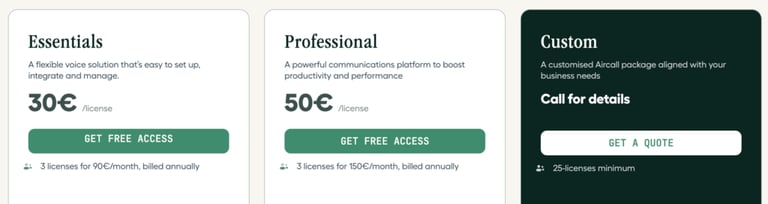
Aircall
Aircall is a modern business phone solution that integrates deeply with CRMs and helpdesk platforms. It’s designed for customer-facing teams that value clean UX, strong reporting, and built-in collaboration tools.
Best For: Customer service and sales teams using CRM and helpdesk integrations.
What Are Aircall's Key Features?
- CRM & Helpdesk Integrations – Connect to HubSpot, Salesforce, etc.
- Shared Inbox – Team members collaborate on live calls.
- Call Assignment – Route and reassign calls instantly.
- Analytics Dashboard – Track KPIs and monitor team performance.
- International Numbers – Operate in over 100 countries.
What Are Aircall's Pros and Cons?
| Pros | Cons |
|---|---|
| Excellent integrations | Feature set may be basic for larger teams |
| Easy for teams to adopt and manage | Add-ons can increase costs |
| Transparent pricing model | Limited offline functionality |
Recommended Reads
How to Pick the Right Virtual Office Phone Number Provider?
With so many options available, choosing the best virtual office phone number app can feel overwhelming. Here are the key aspects to consider when deciding which solution is right for your business:
1. Features That Match Your Needs
Start by listing the features that matter most to your team, like call recording, voicemail transcription, IVR, or integrations. Don’t overpay for bells and whistles you won’t use, but also make sure the essentials are covered.
2. Global Number Availability
If you plan to reach customers in different regions, check for local, toll-free, or international number support. A good provider should offer numbers in the countries you want to expand into, without breaking your budget.
3. User Experience & Support
A clunky dashboard or unreliable support can derail even the best phone system. Look for a platform with intuitive UX, a mobile app, and responsive support, especially if you don’t have an in-house IT team.
CloudTalk’s features, like call routing, analytics, and integrations, are super helpful for streamlining customer communication. Plus, the support team is always responsive and goes above and beyond to assist. It’s a game-changer for any business!
4. CRM & Workflow Integrations
If your business uses tools like Salesforce, HubSpot, or Zendesk, make sure your phone system integrates seamlessly. This can save tons of time and help you deliver a better customer experience.
5. Scalability and Pricing
Think long-term. Will the app grow with your team? Review pricing tiers and add-on costs for extra numbers, features, or agents. Transparent pricing is key, especially for startups or growing companies.
Powering Customer-Focused Communication
The right virtual phone number app offers flexibility, professionalism, and customer experience. As teams go remote and expectations rise, having a system that supports smart routing, CRM integration, and real-time insights is key.
Whether you're a solo founder or scaling globally, choosing the best virtual office phone number can streamline operations and elevate your brand.
Ready to upgrade your business communication?
Sources
Frequently asked questions
A virtual office phone number is a business phone number that operates over the internet rather than through a traditional landline. Virtual phone number apps let you make and receive business calls from anywhere, on any device. Most modern providers also bundle in SMS, voicemail, transcription, AI features, and CRM integrations.
Yes! A virtual phone number for business can be used on any mobile device through the provider’s app.
A virtual phone number app routes calls via the cloud to your existing number, offering flexibility and location independence.
Yes, you can port your number when switching to a top virtual phone number provider.
Leading providers secure your virtual business telephone number with encryption and privacy controls.
Yes, virtual numbers for business often include global coverage and international calling options.
Many apps for business phone numbers support SMS and MMS for professional texting.